
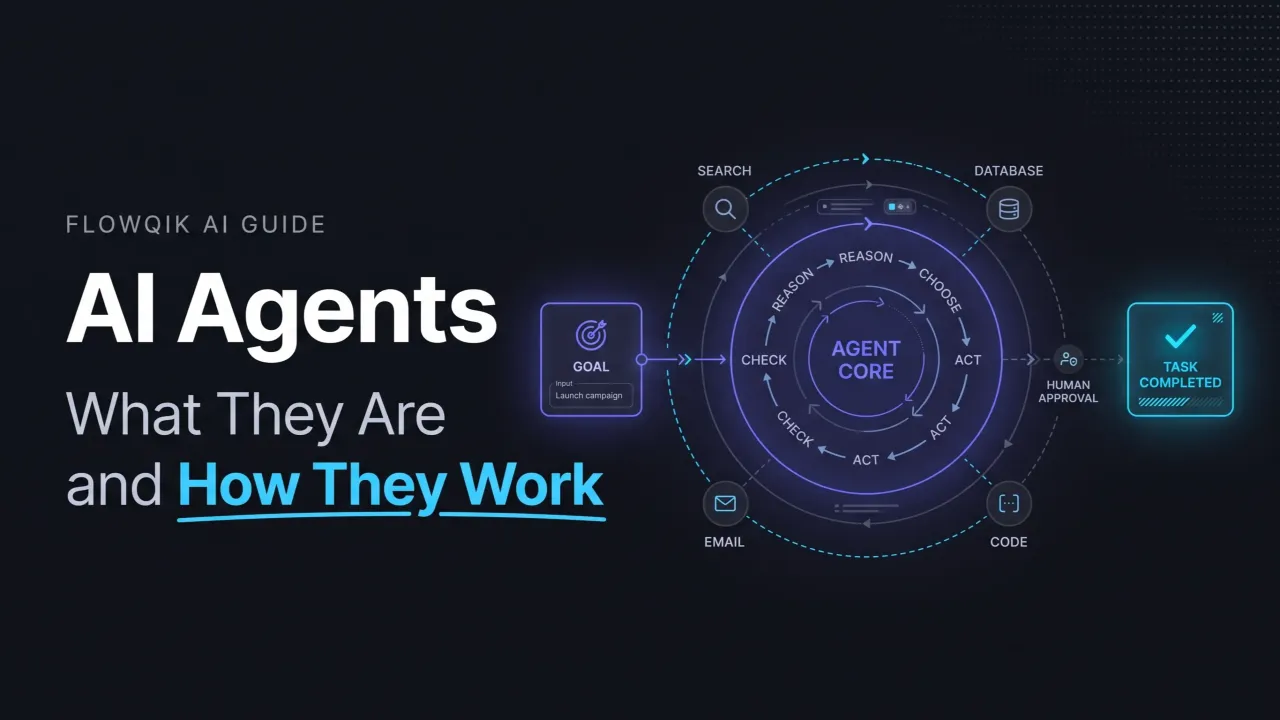
AI Agents: What They Are, How They Work, And Where They Fit
AI agents are software systems that use an AI model to pursue a goal by deciding what to do next, taking actions through tools, checking the results, and repeating that cycle until the task is done or handed back to a person. A chatbot answers your question. An agent is built to get something done: look up the order, check the policy, draft the refund, and ask a human to approve it.
That difference sounds simple, but the term "AI agent" is now used for everything from a customer-service bot to a coding system that edits files for an hour without supervision. This guide explains what actually makes a system agentic, how agents work, the components involved, how much independence they can be given, the main types, realistic examples, and the limitations and controls that matter before you trust one with real work.
This guide is research-based. It draws on published documentation from AI providers, standards bodies, and academic research. FlowQik has not deployed or benchmarked the systems described here, and every scenario below is an illustrative example rather than a real implementation.
What Are AI Agents?
There is no single official definition, and that is worth knowing up front. Major providers describe agents in slightly different ways:
- OpenAI describes agents as "systems that independently accomplish tasks on your behalf," and explicitly excludes simple chatbots and single-turn LLM applications that do not control the workflow (OpenAI).
- Google Cloud defines them as "software systems that use AI to pursue goals and complete tasks on behalf of users," with reasoning, planning, memory, and some level of autonomy (Google Cloud).
- AWS calls an agent "a software program that can interact with its environment, collect data, and use that data to perform self-directed tasks that meet predetermined goals" (AWS).
- Anthropic separates workflows, where models and tools follow "predefined code paths," from agents, where models "dynamically direct their own processes and tool usage" (Anthropic).
The idea is also older than generative AI. In the classic AI textbook definition, an agent is anything that perceives its environment and acts on it (Russell and Norvig). A thermostat qualifies under that definition. When people talk about AI agents today, though, they almost always mean systems built around a large language model (LLM) that can call tools and work through multi-step tasks.
Across these definitions, three features keep showing up: a goal rather than a single prompt, the ability to act on other systems, and control over the next step based on what happened in the previous one. That third feature is what most clearly separates an agent from everything around it.
A Practical Test For "Is This Actually An Agent?"
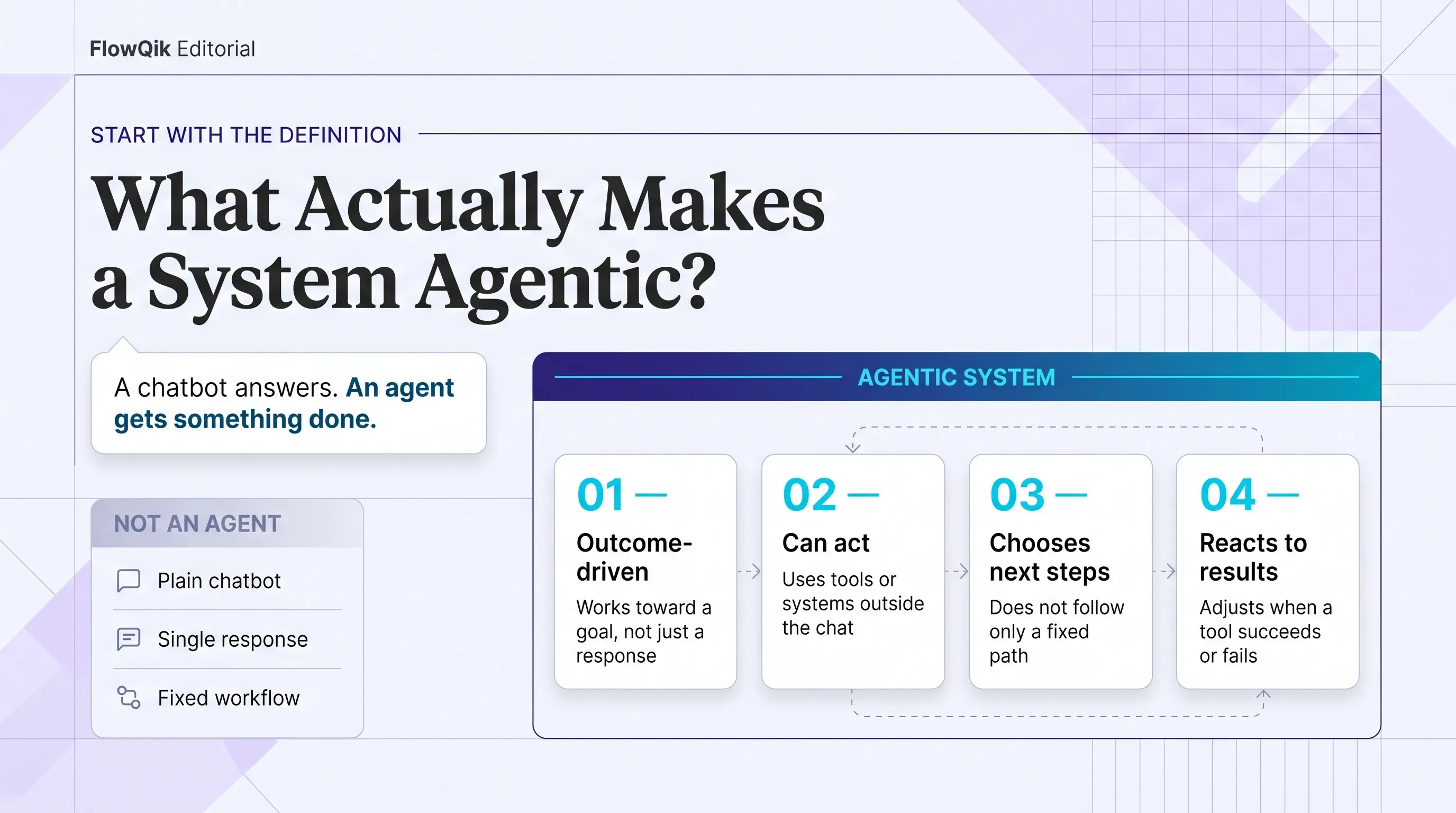
Because vendors use the label loosely, a few questions help you judge a system yourself:
- Does it work toward an outcome, or just produce a response? Summarizing a document is a response. Resolving a support ticket is an outcome.
- Can it take actions outside the conversation? Searching a database, calling an API, editing a file, or sending a message all count. Generating text alone does not.
- Does it choose its own next step? If a developer has fixed every step in advance, the system is a workflow that uses AI, not an agent.
- Does it react to results? An agent should notice when a search returns nothing or a tool call fails, and adjust.
A system that answers yes to all four is agentic in the full sense. Many useful products answer yes to only one or two, and that is not a weakness. It just means they sit at a different point on the spectrum.
AI Agents Vs. Chatbots, AI Assistants, LLMs, And Automation
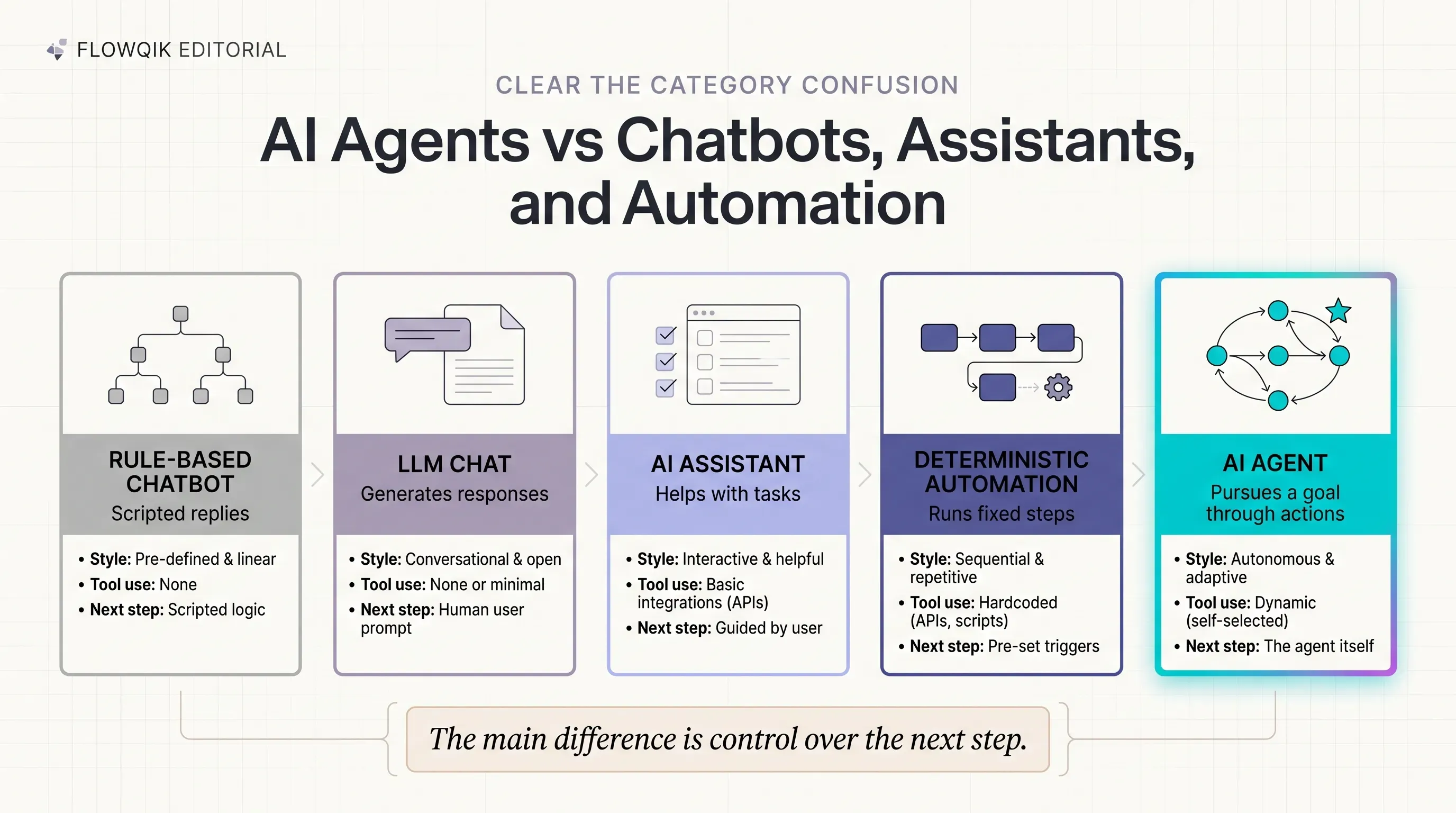
Most confusion about AI agents comes from blurry boundaries with neighboring technologies. The table below compares typical behavior. Real products often mix these categories, so treat the table as a set of reference points.
| System | Main behavior | Tool use | Who decides the next step | Typical example |
|---|---|---|---|---|
| Rule-based chatbot | Matches inputs to scripted replies | None or very limited | Fixed script | FAQ bot with menu buttons |
| LLM / generative AI chat | Generates a response to a prompt | Optional, usually user-initiated | The user | Drafting an email in a chat window |
| AI assistant | Helps a user complete tasks, often with some tools | Yes, mostly on request | Mostly the user | Assistant that books a meeting when asked |
| Deterministic automation | Runs the same predefined steps every time | Yes, fixed integrations | The workflow designer | "When a form is submitted, add a CRM row and send a Slack alert" |
| AI agent | Pursues a goal through a loop of decisions and actions | Yes, chosen by the agent | The agent, within limits | Agent that investigates a ticket, gathers account data, and proposes a resolution |
Agent vs. LLM. An LLM is a model. It takes text in and produces text out. An agent is a system that uses an LLM as its decision engine and wraps it with instructions, tools, memory, and a control loop. The same model can power a plain chat app or an agent. The difference is in what surrounds it.
Agent vs. chatbot or assistant. Google Cloud's comparison is useful here: assistants are mostly reactive and "the user makes decisions," while agents are goal-oriented and can make decisions within their scope (Google Cloud). In practice, the line is blurring as assistants gain tools. A helpful way to think about it is that an assistant helps you do a task, while an agent is given the task.
Agent vs. traditional automation. This distinction matters most for automation builders. Deterministic automation follows the same path every time, so it is predictable, cheap to run, and easy to audit, but it breaks when inputs fall outside what the designer anticipated. Agent behavior is probabilistic. It can handle messy inputs and unexpected situations, but the same request may not produce the same sequence of actions twice. You trade predictability for flexibility, and that tradeoff should be a deliberate choice.
How AI Agents Work: The Agent Loop
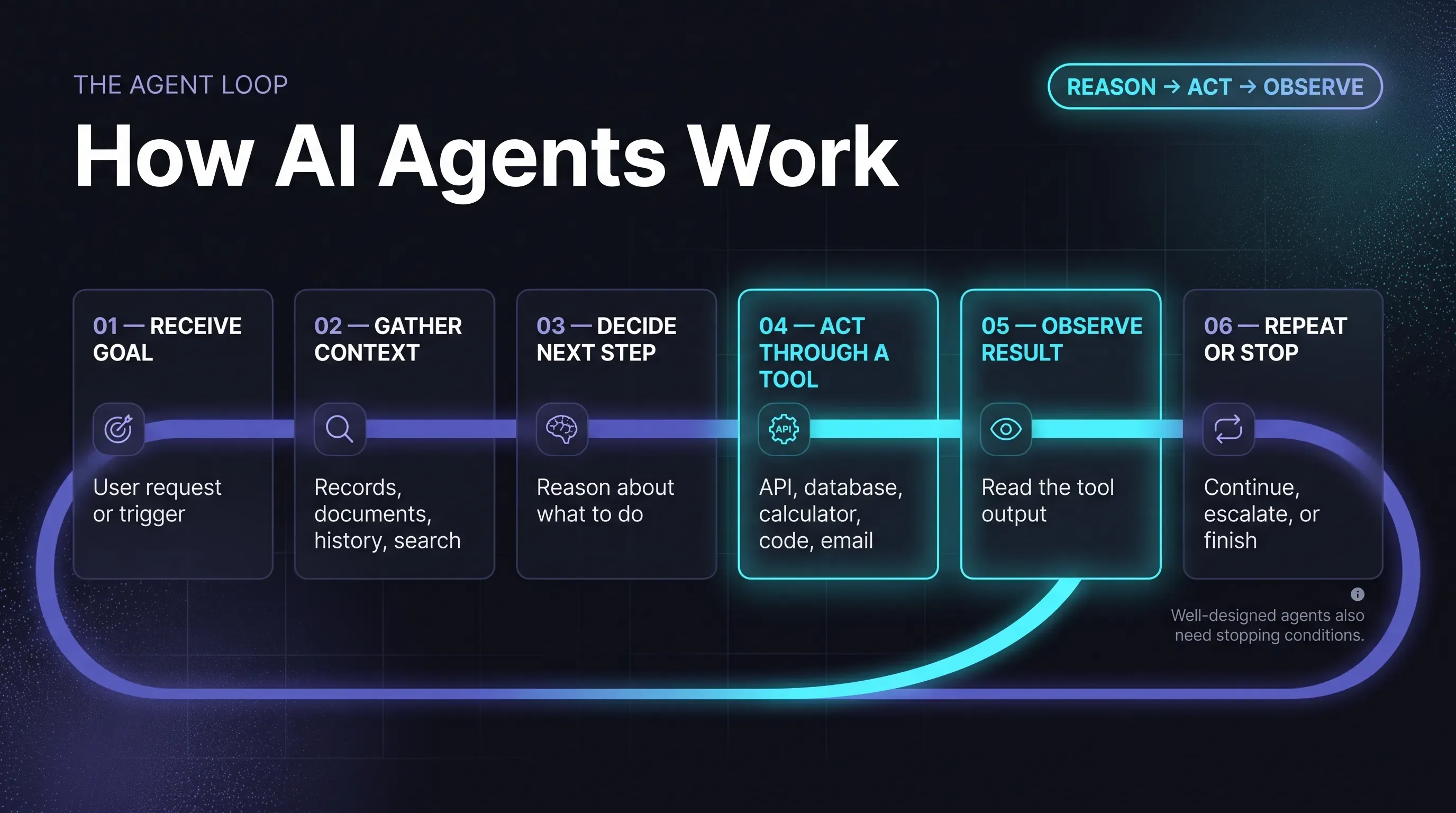
At a conceptual level, nearly every modern AI agent runs some version of the same loop. The details vary by platform, but the pattern is consistent across provider documentation.
- Receive a goal. A user request, a scheduled trigger, or an incoming event gives the agent something to accomplish, along with instructions about how it should behave.
- Gather context. The agent reads what it has been given and may retrieve more: documents, records, previous conversation history, or search results.
- Decide on the next step. The model reasons about the situation and selects an action. For complex goals, this may include breaking the task into smaller steps.
- Act through a tool. The agent calls a tool, such as a database query, an API request, a web search, a calculator, or a code runner.
- Observe the result. The tool's output comes back into the agent's context. Anthropic stresses that agents need to get "ground truth" from the environment at each step to judge progress (Anthropic).
- Evaluate and repeat, or stop. The agent decides whether the goal is met, whether to try something else, or whether to hand off to a human. Well-designed agents also have hard stopping conditions, such as a maximum number of steps, so they cannot loop indefinitely.
This "reason, act, observe" cycle was formalized in research such as the ReAct paper, which showed that interleaving reasoning steps with actions helped language models complete tasks more reliably than reasoning alone (Yao et al., 2022).
A Worked Example
Here is how that loop might look for a hypothetical customer-support agent handling a refund request.
- Goal: A customer writes, "My order arrived damaged. Can I get a refund?"
- Context: The agent retrieves the customer's order record and the company's refund policy.
- Decision: The order is within the 30-day window, the item is eligible, and the order value is below the threshold the agent is allowed to handle.
- Action: The agent requests a photo of the damage, then prepares a refund record in the order system.
- Result: The refund is staged but not yet issued.
- Human review: Because issuing money is irreversible, a support lead approves the refund with one click, and the agent sends the confirmation.
A chatbot could explain the refund policy. The agent checked the facts, made a scoped decision, used systems, and routed the one risky action to a person. That combination is what people mean when they say a system is agentic.
The Core Components Of An AI Agent
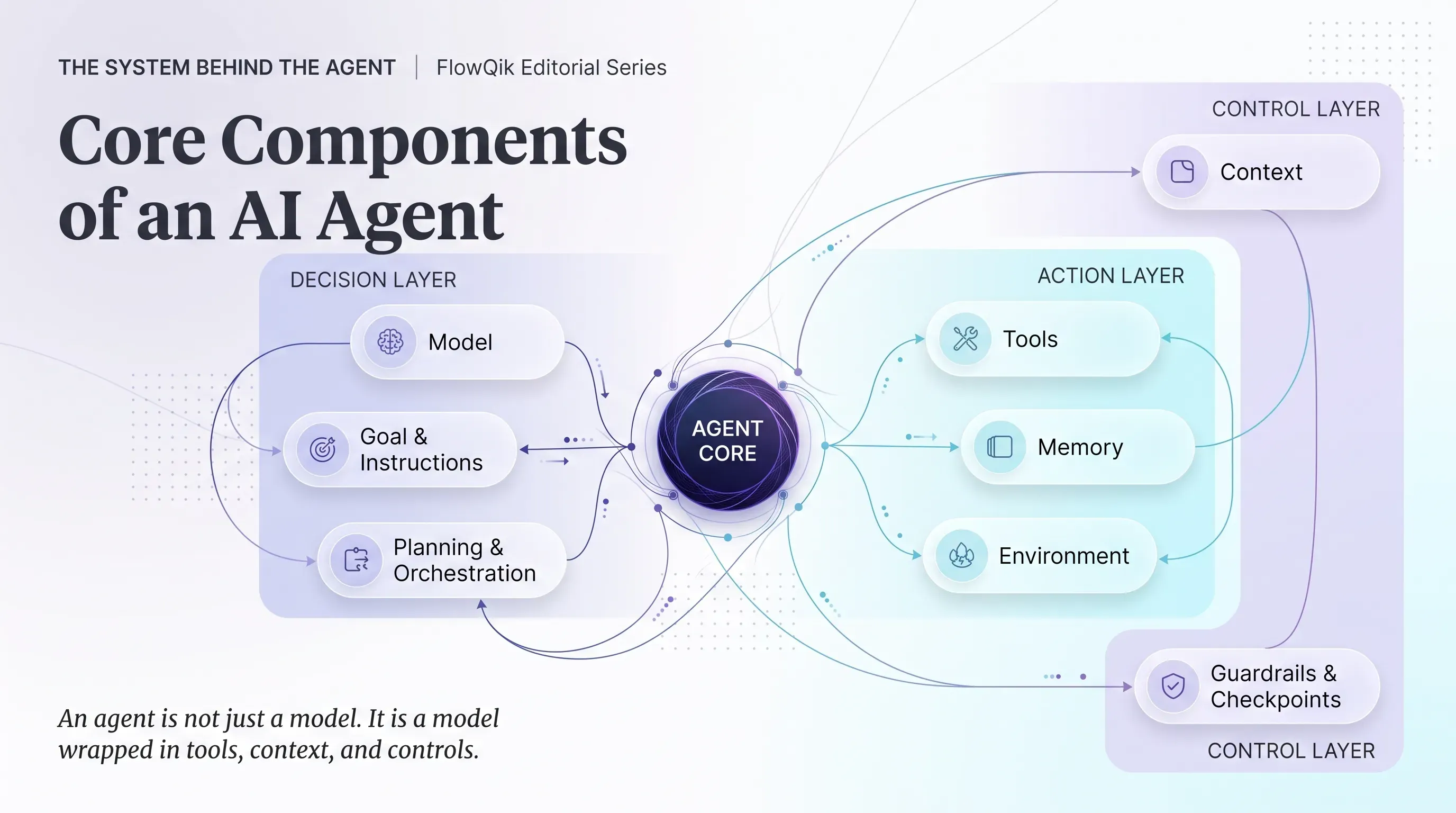
Providers group the parts of an agent differently. OpenAI names three core components (model, tools, instructions), Google Cloud lists persona, memory, tools, and model, and IBM describes seven, including perception, planning, and communication (IBM). The table below combines these into one practical map.
| Component | Role | Example |
|---|---|---|
| Model | Interprets inputs, reasons about the situation, and chooses actions | An LLM that decides whether to search, ask a question, or answer |
| Goal and instructions | Defines what the agent should achieve, how it should behave, and what it must not do | "Resolve billing questions. Never change payment details. Escalate disputes over $500." |
| Context | The information available for the current decision | The ticket text, the customer record, the relevant policy page |
| Tools | Functions and APIs the agent can call to read data or take actions | CRM lookup, email sender, calendar API, code interpreter |
| Memory | Information carried across steps or sessions | Notes from earlier in the task, saved user preferences |
| Planning and orchestration | Logic that breaks down goals, sequences steps, and enforces limits | Step limits, retry rules, task decomposition |
| Environment | The systems and data the agent observes and acts on | A help desk, a code repository, a website, a spreadsheet |
| Guardrails and checkpoints | Controls that block, filter, or pause risky actions | Approval required before sending external emails |
Two of these components deserve a closer look because they are frequently misunderstood.
Memory: What It Is And What It Is Not
Agent memory usually comes in two forms. Short-term memory is the working context of the current task: the conversation, the tool results so far, and the agent's notes. It is limited by the model's context window, so long tasks may require summarizing or dropping older information. Long-term memory is information stored outside the model, such as a database of past interactions or user preferences, which the agent retrieves when relevant.
A common misconception is that agents "learn" continuously from every interaction. Most LLM-based agents do not update their underlying model while they work. When an agent seems to improve, it is usually because it has stored and retrieved new information, or because its builders updated its instructions, tools, or model. Some provider definitions mention learning and self-refinement as agent features, so it is worth asking any specific product exactly what changes over time and how.
Tools And The Environment
Tools are what turn a language model into something that can act. Through tool calling (also called function calling), the model produces a structured request, such as "look up order 4471," which the surrounding software executes before passing the result back to the model.
The set of tools an agent has defines both its usefulness and its risk. An agent with read-only access to a knowledge base can, at worst, give a wrong answer. An agent that can send emails, move money, or delete records can cause real damage if it makes a mistake. Standards for connecting agents to tools are also maturing. The Model Context Protocol (MCP), an open protocol for connecting AI applications to external tools and data, was donated by Anthropic to the Linux Foundation's newly formed Agentic AI Foundation in December 2025 to keep it vendor-neutral (MCP blog).
Autonomy Is A Dial, Not A Switch
One of the most useful ideas in this topic is that autonomy is not a yes-or-no property. Researchers at the University of Washington argue that "an agent's level of autonomy can be treated as a deliberate design decision, separate from its capability" (Feng, McDonald, and Zhang, 2025). In other words, a highly capable agent can still be deployed with tight limits, and that is often the right choice.
A practical way to think about autonomy is to separate two kinds of authority:
- Decision authority: Can the agent decide what should happen?
- Execution authority: Can the agent make it happen without someone signing off?
An agent might be trusted to decide which refund is appropriate but not to issue it. That separation is one of the simplest and most effective safety patterns available, and OWASP recommends separating decision-making from execution for critical operations (OWASP).
| Autonomy level | What the agent does | Human role | Good fit |
|---|---|---|---|
| Recommend only | Analyzes and suggests actions | Decides and acts | High-stakes decisions, new deployments |
| Act with approval | Prepares actions and waits for sign-off | Approves or rejects each action | Customer-facing messages, payments, record changes |
| Bounded execution | Acts on its own within defined limits | Monitors and handles exceptions | Routine, reversible tasks with clear rules |
| Higher-autonomy goal pursuit | Plans and executes multi-step work over longer periods | Sets goals, reviews outcomes | Contained environments, such as a sandboxed code project |
Feng and colleagues describe a similar progression in terms of the user's role, moving from operator to collaborator, consultant, approver, and finally observer. Most business deployments today sit in the middle of this range. The far end, where agents pursue open-ended goals with little intervention, raises its own design and risk questions, which we cover in our guide to Autonomous AI Agents.
Types Of AI Agents
There are two very different ways people classify AI agents, and mixing them up causes a lot of confusing content. One is the classic academic taxonomy. The other is a practical grouping of how modern LLM-based agents are used.
The Classic Taxonomy
This classification comes from foundational AI research and appears in most "types of AI agents" articles. It describes how an agent makes decisions, and it predates LLMs by decades (Russell and Norvig).
- Simple reflex agents act only on the current input using condition-action rules. A spam filter that blocks any email containing certain phrases works this way. They are fast and predictable but have no awareness of history.
- Model-based reflex agents keep an internal picture of the world, so they can act sensibly when they cannot see everything at once. A system tracking a support ticket's status across several messages is a simple example.
- Goal-based agents choose actions by considering whether they move toward a defined goal. Route planning is the textbook case.
- Utility-based agents go further by weighing how good different outcomes are, not just whether they reach the goal. Choosing the cheapest delivery option that still arrives on time is a utility decision.
- Learning agents improve their behavior over time based on feedback, such as a recommendation system that adapts to what users click.
AWS also lists hierarchical agents, where higher-level agents delegate work to lower-level ones, and multi-agent systems (AWS). This taxonomy is still useful for understanding decision-making styles. Most LLM-based agents do not fit neatly into one box, though. A single modern agent may combine goal-based planning, utility-style tradeoffs, and model-based state tracking.
How Modern Agents Are Commonly Grouped
For business and automation readers, these practical groupings are usually more helpful:
- By interaction style. Google Cloud distinguishes interactive agents that work directly with people, such as support or research assistants, from background agents that run behind the scenes on routine processes (Google Cloud).
- By number of agents. A single-agent system uses one agent with a set of tools. A multi-agent system splits work across several specialized agents that coordinate, for example, one agent researching and another reviewing. OpenAI's guidance is to get as much as possible out of a single agent first and split into multiple agents only when logic or tool sets become too complex to manage (OpenAI).
- By function. Common functional labels include research agents, coding agents, data agents, customer-service agents, and computer-use agents that operate software through a graphical interface the way a person would.
These categories overlap. A customer-service agent can be interactive, single-agent, and model-based all at once. The labels describe different dimensions, not mutually exclusive boxes.
AI Agent Examples And Use Cases
The best way to understand AI agents is to look at what they actually do step by step. The examples below are hypothetical and simplified, but they reflect the kinds of tasks providers document and recommend.
Research briefing agent. Given a question such as "Summarize recent regulatory changes affecting our product category," the agent searches a set of approved sources, reads the relevant documents, notes where sources disagree, and produces a structured briefing with citations. A person reviews it before it is shared. The agent's value is in the gathering and organizing. The judgment about what matters stays with the reader.
Operations triage agent. Incoming requests arrive in a shared inbox. The agent reads each one, pulls related records, classifies the request, and routes it to the right team. Clear cases follow fixed rules, and ambiguous ones are flagged with a short explanation. This blends deterministic routing with model judgment, which is often more reliable than relying on either alone.
Sales support agent. When a new lead comes in, the agent gathers context from the CRM and the company's website, summarizes the likely need, and drafts a suggested next step for the sales rep. It does not email the prospect directly. Keeping outbound communication with a human is a common and sensible boundary.
Software development agent. Given a bug report, a coding agent inspects the relevant code, runs tests, proposes a fix, and runs the tests again to check the result. A developer reviews the proposed change before it is merged. Coding is a strong fit for agents because tests provide clear, objective feedback at each step.
Internal knowledge agent. An employee asks, "What is our travel reimbursement limit for international trips, and can you start the request?" The agent retrieves the policy, answers with a reference to the source document, and pre-fills the reimbursement form for the employee to submit.
Looking across these examples, a pattern emerges about where agents fit and how much oversight they need.
| Business need | Agent behavior | Human oversight needed |
|---|---|---|
| Gather and summarize information | Searches approved sources, compiles findings with references | Review before sharing or acting on conclusions |
| Sort and route incoming work | Reads, classifies, enriches, and routes requests | Spot checks and handling of flagged exceptions |
| Prepare customer or prospect actions | Drafts replies, refunds, or recommendations | Approval before anything external or financial happens |
| Analyze data | Queries data, runs calculations, explains results | Verification of method and numbers before decisions |
| Change code or systems | Proposes and tests changes in a controlled environment | Review before changes reach production |
OpenAI's guidance points to three situations where agents tend to earn their place: decisions that need nuanced judgment, rule sets that have become too complex to maintain, and processes that depend heavily on unstructured data such as emails, documents, or conversations (OpenAI).
Where AI Agents Fit Within AI Automation
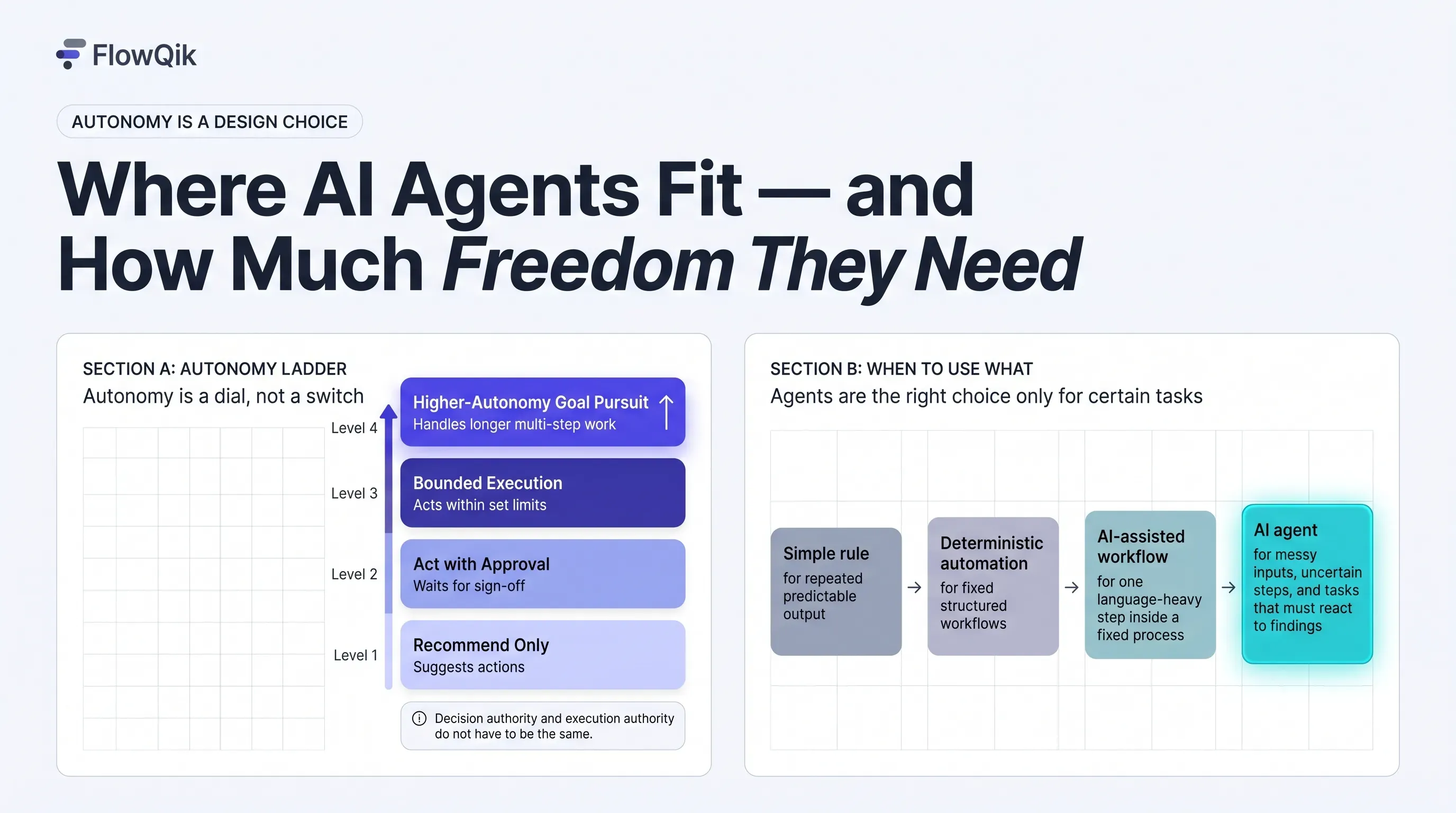
AI automation is the broader field. AI agents are one approach within it. It helps to picture a progression of options, each adding flexibility along with cost and unpredictability:
- Simple rules, such as an email filter or a spreadsheet formula.
- Deterministic automation, where a workflow runs fixed steps across apps.
- AI-assisted workflows, where an AI model handles one step, such as classifying a message or drafting a reply, inside an otherwise fixed process.
- Agentic workflows, where agents handle certain decisions or sub-tasks inside a larger structured process with triggers, approvals, and handoffs.
- AI agents, where the model directs more of the process itself.
Many effective systems combine these. A predictable workflow handles the trigger, the data movement, and the approval step, while an agent handles the one part that requires judgment. How that combination is designed and orchestrated is the subject of our guide to Agentic Workflows. For the bigger picture of rules, workflows, and AI across the whole range of automation options, see the AI Automation Guide.
How you build an agent also varies. Developers often use open-source frameworks and libraries, which we cover in Open Source AI Agents. A growing number of platforms let non-developers configure agent-like systems through visual builders, which is the focus of No-Code AI Agents.
When An AI Agent Is The Right Tool, And When It Is Overkill
Anthropic's advice to builders is to find "the simplest solution possible" and add agentic complexity only when it clearly improves results, because agentic systems "trade latency and cost for better task performance" (Anthropic). That is a good rule for anyone evaluating an agent, not just developers.
| If your task looks like this | Start with |
|---|---|
| The same input always needs the same output | A simple rule |
| Fixed steps across apps, with structured data and predictable paths | Deterministic automation |
| A fixed process with one step that needs language understanding (classify, extract, summarize, draft) | An AI-assisted workflow |
| The number of steps cannot be predicted in advance, inputs are messy, and the system must react to what it finds | Consider an AI agent |
A few questions sharpen the decision:
- Could you write the steps down in advance? If yes, a workflow will usually be cheaper and more reliable.
- How costly is a mistake? The higher the cost, the more you need approvals, narrow permissions, or a simpler approach.
- Can success be checked? Agents work best where results can be verified, such as tests passing, a record matching, or a source supporting the claim.
- Is the volume worth the setup? Agents need instructions, tools, testing, and monitoring. A task done twice a month may not justify that effort.
Choosing an agent for a task that a fixed workflow could handle tends to add cost, latency, and unpredictability without adding value.
Limitations And Failure Modes
AI agents can fail in ways that are different from traditional software. Understanding these failure modes is what separates realistic expectations from hype.
Hallucinations and incorrect reasoning. The model at the center of an agent can produce confident but wrong conclusions. In a chat, that is a bad answer. In an agent, it can become a wrong action.
Compounding errors. Because agents work in multiple steps, a small mistake early on can carry forward. A misread order number in step two can lead to the wrong refund in step five. Anthropic specifically cites the risk of compounding errors as a reason for extensive testing in sandboxed environments and appropriate guardrails.
Inconsistency across runs. An agent may handle a task correctly once and fail on the next identical attempt. The τ-bench study introduced a "pass^k" measure for exactly this: how often an agent succeeds on every one of k repeated attempts. In its 2024 tests, a leading model at the time succeeded on fewer than half the tasks, and in the retail scenario its success rate across eight repeated attempts fell below 25% (Yao et al., 2024). Models have improved since, but the lesson holds: a single successful demo says little about reliability.
Tool and integration failures. APIs time out, return unexpected formats, or change. An agent that does not handle these well may stall, retry endlessly, or make assumptions.
Context limits. Long tasks can exceed what fits in the model's working context, so earlier details may be summarized or lost.
Cost and latency. Each step in the loop typically involves at least one model call. Multi-step tasks are slower and more expensive than a single response, and runaway loops can become expensive quickly, which OWASP calls "denial of wallet."
Prompt injection and agent hijacking. This is the most distinctive security risk for agents. Because agents read external content such as web pages, emails, and documents, an attacker can hide instructions in that content. NIST's Center for AI Standards and Innovation (CAISI) describes agent hijacking as inserting "malicious instructions into data that may be ingested by an AI agent, causing it to take unintended, harmful actions." In its January 2025 evaluation, new red-team attacks raised success rates against the tested agent from 11% to 81% compared with existing baseline attacks (NIST). Those figures apply to that specific model and test environment, but they show why external content should never be treated as trusted instructions.
Security, Permissions, And Human Oversight
Most agent risk can be reduced by controlling what an agent is allowed to do rather than relying on the model to always behave well. OWASP's AI Agent Security guidance recommends several principles that apply at any scale (OWASP):
- Least privilege. Give the agent only the tools and data access its task requires. Read-only access where possible.
- Approval for high-impact actions. Require a human to approve anything irreversible, financial, or external-facing.
- Treat external data as untrusted. Content the agent reads should inform its work, not override its instructions.
- Protect memory. Validate what gets stored, and keep one user's data separate from another's.
- Log everything. Record decisions and tool calls so behavior can be reviewed and problems traced.
- Set hard limits. Cap steps, retries, and spending per task.
Human oversight works best when it is designed into specific points rather than added as a general hope. OpenAI recommends escalating to a person when an agent exceeds failure thresholds or reaches high-risk actions (OpenAI). A practical pattern is to let the agent do the gathering, analysis, and preparation, then put a person at the point where the action becomes hard to undo.
Evaluating And Governing AI Agents
Evaluating an agent is different from evaluating a chatbot. You are judging not only the final answer but the path the agent took to reach it. Useful questions include:
- Task success: Did it achieve the goal on a realistic set of test cases, including tricky ones?
- Consistency: Does it succeed reliably when the same task is repeated?
- Process quality: Did it use the right tools, in a sensible order, without unnecessary steps?
- Safety behavior: Did it stop, escalate, or refuse when it should have?
- Cost and speed: Is the time and spend per task acceptable at expected volume?
- Escalation rate: How often does it need human help, and is that falling or rising over time?
Reviewing the full sequence of steps for a sample of tasks, not just the outputs, is often where problems become visible.
Governance answers the organizational questions around those technical ones: who owns the agent, what it is permitted to do, what data it can touch, how its actions are audited, and how it is changed or shut down. Formal standards are still developing. In February 2026, NIST's CAISI launched an AI Agent Standards Initiative focused on industry-led standards, open protocols, and research into agent security and identity (HPCwire coverage of the NIST announcement). Until those standards mature, the practical baseline is clear ownership, documented permissions, logged actions, and defined human checkpoints.
Choosing Your Next AI Agent Topic
Once you understand what AI agents are and where they fit, the right next step depends on what you want to do with them:
- If you want to understand agents that operate with minimal human involvement, and the risks that come with it, read Autonomous AI Agents.
- If you are designing a business process where agents handle certain steps alongside fixed automation and approvals, start with Agentic Workflows.
- If you want to build an agent without writing code, explore No-Code AI Agents.
- If you are a developer evaluating frameworks and self-hosted options, see Open Source AI Agents.
- If you are still deciding whether agents are the right approach at all, the AI Automation Guide covers the full range of options.
A sensible first project is small and reversible: one well-defined task, read-heavy tools, a human approving every action, and a clear way to check whether the agent got it right. Widen its permissions only after it has proved reliable.
Discussion
Comments
No approved comments yet. Be the first to join the discussion.