
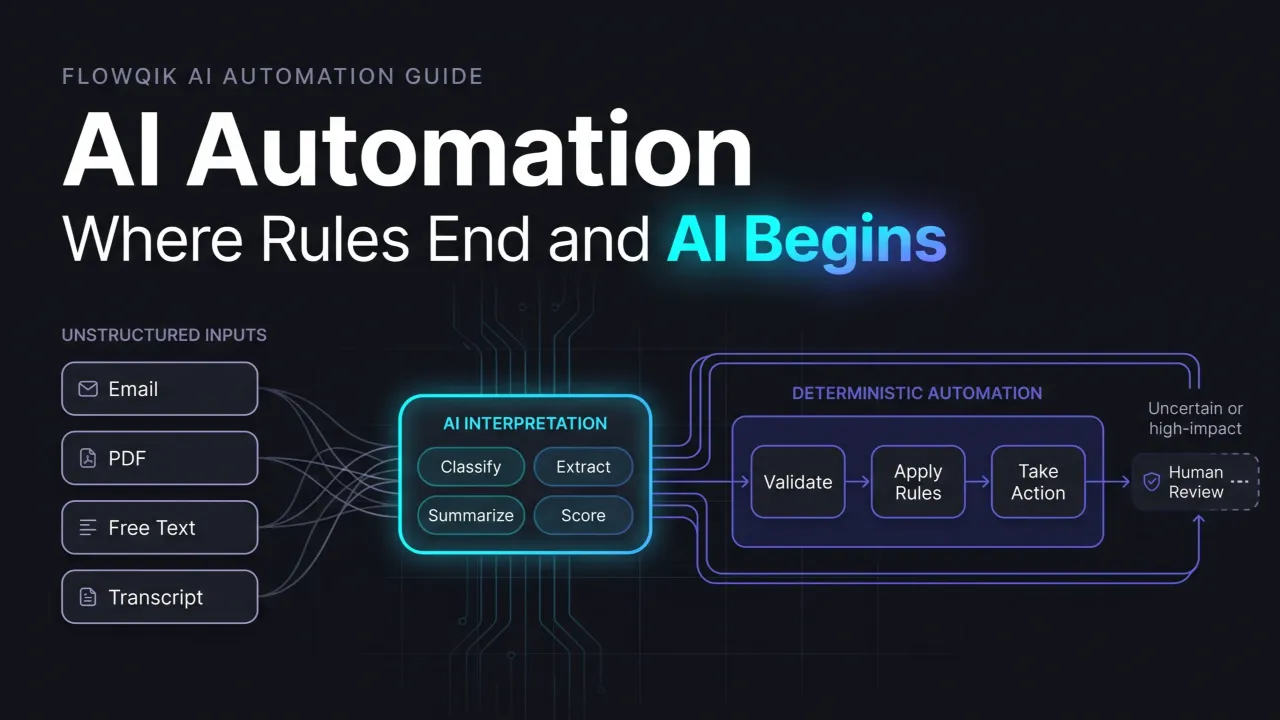
AI automation is the use of artificial intelligence inside an automated process to handle the steps that ordinary software rules cannot: reading an email to work out what the sender wants, pulling the right fields out of an invoice, summarizing a long support thread, or judging which new lead deserves a call today. The rest of the process, such as moving data between apps, applying company policies, and sending notifications, is usually still handled by conventional automation.
That split is the most useful way to understand the topic. Automation is about execution: doing the same steps reliably at any volume. AI is about interpretation: making sense of messy, variable input that a fixed rule cannot anticipate. AI automation combines the two, and most of the important design decisions come down to where one should stop and the other should take over.
This guide explains what AI automation means in practical terms, how a typical system works from trigger to result, the components involved, realistic examples, the benefits and risks worth planning for, and how AI automation relates to AI workflows, AI agents, and more autonomous systems. It draws on current documentation from AI providers, cloud vendors, and security and standards bodies rather than hands-on testing of specific products, and it stays at the concept level so you can decide which specialist topic to explore next.
What AI Automation Means In Practice
Official definitions differ in emphasis. AWS describes AI automation as using AI technologies to expand the capabilities of automation, presenting it as an evolution of robotic process automation (RPA). Microsoft defines it as using AI to perform tasks or streamline processes that would otherwise require human effort. IBM uses the older umbrella term intelligent automation (also called cognitive automation), which combines AI with business process management and RPA, with AI acting as the decision engine.
Beneath the different wording, these sources agree on one point: AI automation is not a single product category. It is a design pattern in which an AI model performs a step that depends on judgment or interpretation, and automation carries the result into the systems where the work actually happens.
AI And Automation Are Two Different Jobs
It helps to separate the two terms before combining them. Automation without AI is everywhere: a form submission that creates a CRM record, a scheduled weekly report, a rule that files paid invoices into a folder. None of these needs intelligence, because the input is predictable and the rule is clear.
AI without automation is just as common. Asking a chatbot to summarize a document is a useful AI task, but a person still copies the result, decides what it means, and takes the next step. Nothing runs on its own.
AI automation appears when the two are connected. An event starts the process, an AI model interprets the input, and the output drives an action without someone manually carrying information between tools. A person may still approve the result, but they are no longer the transport layer between systems.
Which Kinds Of AI Are Involved
Earlier generations of AI automation relied mainly on specialized machine learning models: optical character recognition for scanned documents, classifiers for spam or fraud, and forecasting models for demand planning. Those are still widely used. The bigger recent change is the arrival of large language models (LLMs) and multimodal foundation models that can perform many language and document tasks from written instructions, without training a separate model for each task. AWS identifies foundation models, retrieval-augmented generation (RAG), and multimodal AI as core building blocks of current AI automation.
For a business reader, the practical consequence is that tasks which once required a data science project, such as classifying free-text requests or extracting fields from documents with varied layouts, can now often be prototyped with clear instructions and a sample of real data. Whether the result is reliable enough to run unattended is a separate question, and it is the one that determines most of the design work.
Rules Versus Judgment: AI Automation Vs Traditional Automation
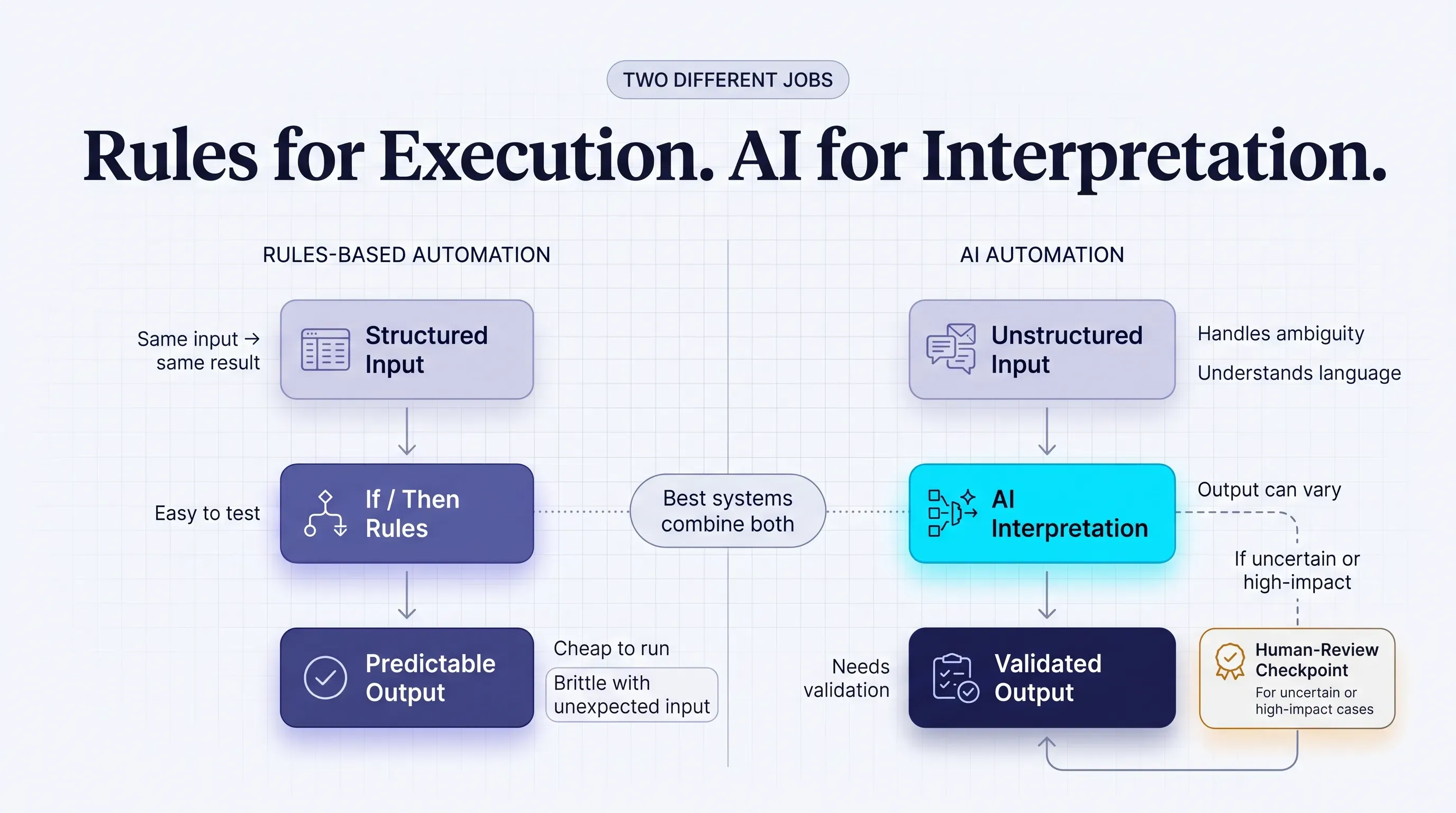
Traditional automation is deterministic. Given the same input, a rule produces the same output every time, which makes it predictable, inexpensive to run, and straightforward to test. Its weakness is brittleness: when input arrives in a format nobody anticipated, the rule either fails or does the wrong thing.
AI models are probabilistic. They generate the most likely appropriate output based on patterns learned from data, which lets them handle variation, ambiguity, and natural language. The tradeoff is that the same input can occasionally produce a different result, and a model can produce an answer that sounds certain but is wrong. NIST's Generative AI Profile calls this confabulation: "the production of confidently stated but erroneous or false content," more commonly known as hallucination.
| Consideration | Rules-based automation | AI automation |
|---|---|---|
| Typical input | Structured data such as form fields, database rows, and fixed file formats | Structured and unstructured data such as emails, PDFs, chat messages, images, and free text |
| Decision logic | Explicit if/then rules written by people | Model output guided by instructions, examples, and context, usually combined with rules |
| Predictability | Same input, same output | Output can vary; quality is measured as a rate rather than guaranteed |
| Handling ambiguity | Fails or sends the case to an exception path | Can interpret intent and incomplete information, sometimes incorrectly |
| Testing approach | Check each rule and known edge case | Evaluate against a set of real examples and track accuracy over time |
| Typical failure | Breaks visibly on unexpected input | Produces plausible but wrong output that may go unnoticed |
| Running cost | Very low per run | Model usage adds cost and some delay to each run |
| Oversight | Mostly for exceptions | Designed-in review for high-impact or uncertain outputs |
The failure row matters most. A rules-based automation that breaks usually announces it with an error, a missing field, or a stalled run. An AI step that misreads an invoice total can return a perfectly formatted, believable number. This is why AI automation needs validation and review built in from the start rather than added after something goes wrong.
Where RPA Fits
Robotic process automation is a specific form of traditional automation in which software bots repeat the clicks and keystrokes a person would make in an application. It is especially useful for older systems that lack APIs. On its own, RPA follows recorded steps and has no understanding of the content it moves.
Many vendors now pair RPA with AI so bots can read documents or deal with exceptions, which is the evolution AWS and IBM describe. AI automation and RPA are therefore not competing alternatives. RPA is one way to execute actions, and AI is one way to make the interpretations those actions depend on.
Good AI Automations Are Mostly Rules
A common misconception is that adding AI means replacing rules. In well-designed systems, the model handles only the steps that genuinely require interpretation, and everything else stays deterministic. The AI decides what an email is about; a rule decides which queue that category goes to. The AI extracts an invoice amount; a rule checks it against the purchase order.
Keeping the AI step narrow makes the whole system cheaper to run, easier to test, and easier to fix when something changes. It also makes failures easier to locate, because there are fewer places where behavior can vary.
How AI Automation Works, From Trigger To Result
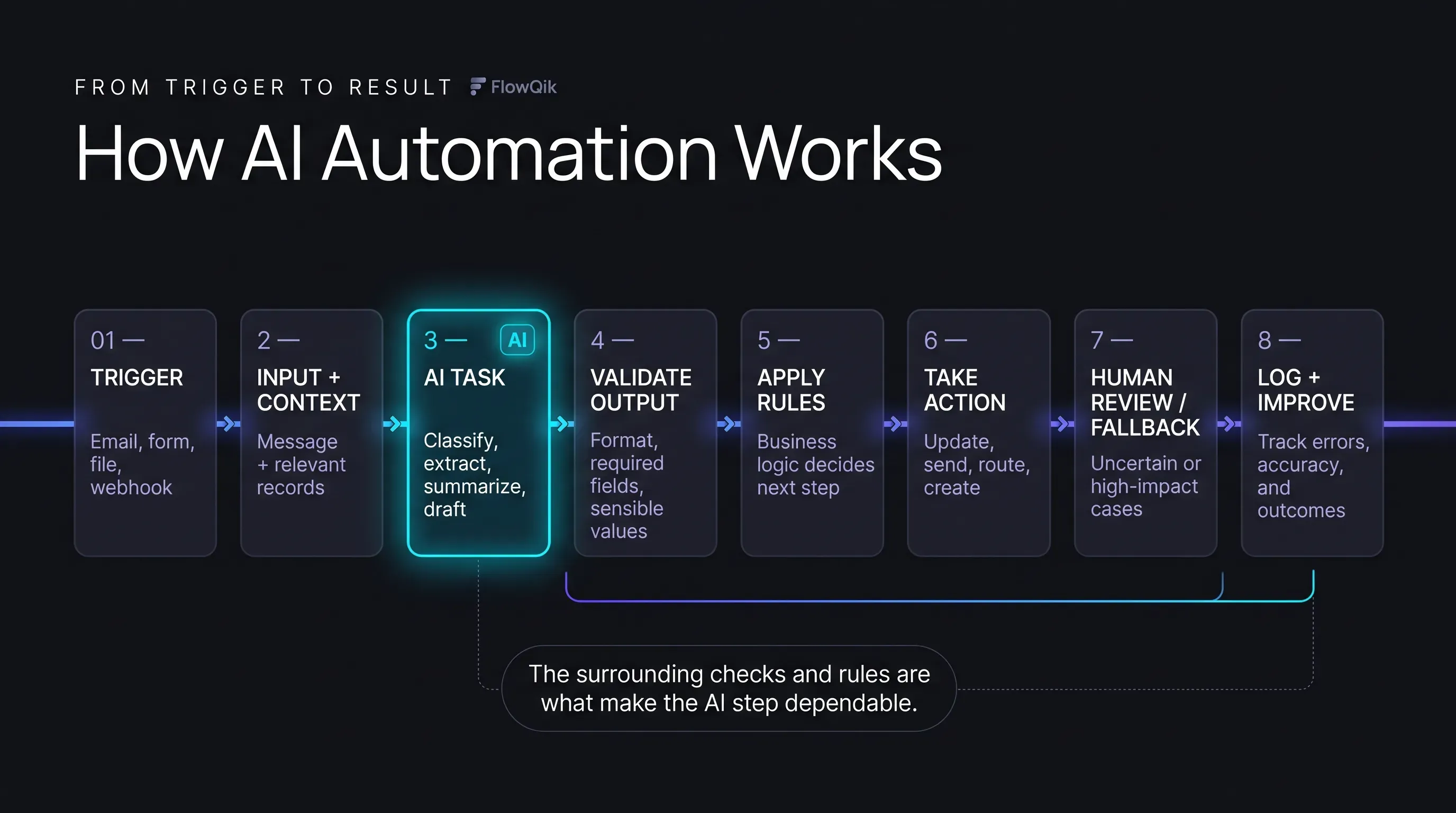
Whatever platform runs them, most AI automations follow a similar sequence. The model below is conceptual rather than a build tutorial, but it shows exactly where AI sits and where it should not.
- Trigger. An event starts the process: a new email, a form submission, an uploaded file, a scheduled time, a database change, or a webhook from another app. Triggers are almost always rules-based.
- Input and context. The automation gathers what the model needs: the message or document itself, plus relevant context such as the customer record, product list, or policy text. When that context comes from a company knowledge base, it is often supplied through retrieval (RAG), which pulls the most relevant passages into the request.
- AI task. The model performs a defined job, such as classifying, extracting, summarizing, drafting, or scoring, guided by written instructions (the prompt) and sometimes worked examples.
- Output validation. The result is checked before anything acts on it. Checks can confirm the output follows a required format, that values fall within sensible ranges, and that required fields are present. Some model APIs can enforce a format directly; OpenAI's Structured Outputs documentation, for example, describes a mode that keeps responses aligned with a supplied JSON Schema. A correct format does not guarantee correct content, so value checks still matter.
- Decision rules. Business logic decides what happens next based on the validated output: which team gets the ticket, whether an invoice needs approval, whether a lead meets the threshold for sales follow-up.
- Action. The automation updates a record, sends a message, creates a task, files a document, or calls another system's API.
- Human review and fallback. Outputs that fail validation, look uncertain, or would trigger a high-impact action go to a person instead of proceeding automatically.
- Logging and feedback. Each run is recorded so errors can be traced, accuracy can be measured, and instructions or rules can be improved.
The AI appears in one of eight stages. That proportion is typical. Some automations call a model more than once (for example, extracting fields and then drafting a reply), but the surrounding structure of triggers, checks, rules, and actions is what turns an AI capability into a dependable business process.
Worked Example: Support Email Triage
Imagine a small software company that receives several hundred support emails a week. A simple AI automation for that inbox might look like this:
- Trigger: A new email arrives in the support inbox.
- Input: The email subject and body, plus the sender's plan level from the CRM.
- AI task: Classify the request as billing, bug report, how-to, or cancellation; rate its urgency; and write a two-sentence summary.
- Validation: Confirm the category is one of the allowed values and the summary exists. If not, mark the email for manual triage.
- Rule and decision: Cancellations go to the retention team, bug reports from paid plans go to the priority queue, and how-to questions get a suggested help article attached.
- Action: Create the help desk ticket with category, priority, and summary filled in.
- Human review: Agents read the original message before replying, and anything the model marked as unclear appears in a separate triage view.
- Result: Tickets arrive sorted and summarized, while every customer reply is still written or approved by a person.
Keeping replies human here is a deliberate choice. A misclassified ticket is cheap and easy to correct; an inaccurate promise sent straight to a customer is not. Branching, error handling, and platform-level build decisions for workflows like this are covered in FlowQik's AI workflow automation guide.
The Core Components Of An AI Automation System
The stages above rely on a consistent set of building blocks. Different platforms name them differently, but the roles are the same.
| Component | Role | Example |
|---|---|---|
| Trigger | Starts the process | Incoming email, new spreadsheet row, scheduled run |
| Data and context | Gives the model what it needs to make a sound judgment | Customer history, product catalog, policy documents from a knowledge base |
| Instructions | Define the task, allowed outputs, and limits | "Classify into one of five categories; answer 'unclear' if unsure" |
| AI model | Performs the interpretation step | An LLM, a document extraction model, or a trained classifier |
| Output format and validation | Make results usable and catch implausible ones | Required fields, value ranges, cross-checks against source data |
| Business rules | Apply company policy consistently | Approval thresholds, routing tables, service-level rules |
| Integrations and APIs | Connect to the systems that hold data or take actions | CRM, help desk, accounting software, messaging tools |
| Human review | Handle exceptions and approve high-impact actions | Approval queue, review dashboard, escalation to a named owner |
| Monitoring and logs | Make behavior visible and measurable | Run history, error alerts, periodic accuracy reviews |
Two of these are routinely underestimated. The first is data and context. A model can only judge well with the information it receives, so an automation that classifies support requests without knowing the customer's plan, or drafts replies without current policy text, will produce confident but poorly grounded output.
The second is instructions. Prompts behave like configuration: a small wording change can shift results across thousands of runs. Teams that treat instructions like code, with versions, testing, and a clear owner, find problems much earlier than teams that edit them casually.
Permissions also deserve attention at the component level. Every integration an automation uses is access to a real system. The OWASP guidance on excessive agency recommends limiting AI-connected systems to the minimum functions and permissions they need, such as read-only access where writing is unnecessary.
What The AI Step Actually Does
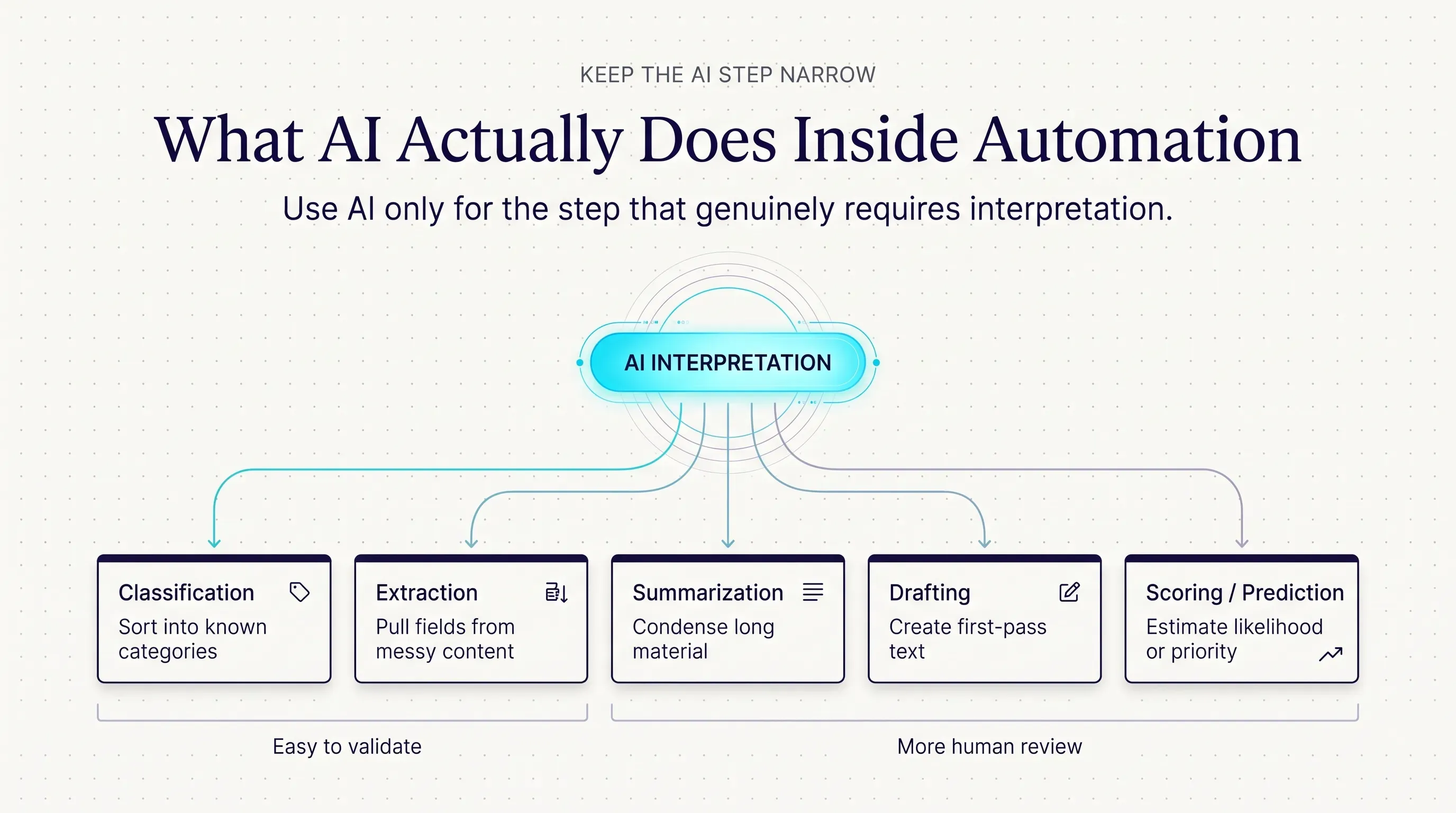
Inside most business automations, the AI step performs one of a small number of jobs. Knowing which job you need is the fastest way to judge whether AI is appropriate and how much review its output requires.
- Classification sorts input into predefined categories, such as request type, document type, sentiment, or priority. It is often the lowest-risk AI task because the output is limited to a known list that is easy to validate.
- Extraction pulls specific fields out of unstructured content, such as invoice numbers, dates, names, or line items. Results can usually be checked against the source document or other records.
- Summarization condenses long material such as email threads, call transcripts, or reports. It saves reading time, but it is harder to verify automatically, and omissions are the most common failure.
- Drafting produces new text such as replies, product descriptions, or follow-up messages. It has the most variability and usually benefits from human review before anything reaches a customer.
- Scoring and prediction estimate likelihood or priority, such as lead fit, churn risk, or the chance a transaction is fraudulent. This is often handled by traditional machine learning and needs monitoring for drift and bias.
Decision Support Versus Automated Execution
A second distinction matters even more than the type of task: does the AI output inform a person, or does it trigger an action directly? In decision support, the AI prepares a summary, recommendation, or draft, and a person decides what to do. In automated execution, the output flows straight into an action.
The same AI task can operate in either mode. A sensible pattern is to start a new automation in decision-support mode, measure how often the AI is right, and move specific low-risk paths into automated execution only when the evidence supports it.
AI Automation Examples And Use Cases
The examples below are hypothetical illustrations of common patterns, not case studies. Each shows where AI adds value and where rules or people still carry the work.
Invoice And Document Intake
When a supplier invoice arrives by email, the automation saves the attachment and sends it to a document model that extracts the supplier name, invoice number, date, line items, and total. Rules then check the total against the matching purchase order and flag duplicates. Invoices that match within tolerance are entered into the accounting system as drafts; mismatches, unfamiliar suppliers, and amounts above an approval threshold go to a finance team member. The AI removes manual keying, while payment authority stays with people and rules.
Lead Enrichment And Routing
A new demo request triggers a lookup of the company's website and public information. An AI step summarizes what the company does, classifies its industry, and estimates fit against the ideal customer profile. Rules route high-fit leads to the right sales rep by region and send lower-fit leads into a nurture sequence. Sales reps see the AI summary as background, but outreach is still written and sent by the team.
Meeting Notes To Tasks
After an internal meeting, the transcript is sent to a model that extracts decisions, action items, owners, and due dates. Validation checks that each action has a named owner who exists in the project tool. The automation creates draft tasks and posts a summary to the team channel, where the meeting lead confirms them. This is a good example of decision support: the AI does the tedious extraction, and a person confirms what was actually agreed.
Recurring Operational Reporting
Every Monday, the automation pulls figures from sales, support, and finance systems. The numbers are calculated by deterministic queries, not by the model. The AI step only writes a short plain-language commentary explaining notable changes, which a manager reviews before the report is shared. Keeping calculations out of the model is a deliberate guard against invented figures.
Internal HR And Policy Questions
An internal help channel uses retrieval to answer employee questions from the current handbook and benefits documents, citing the source passage and escalating anything personal or unclear to HR. Decisions about individual people are a different matter. The EU AI Act lists AI systems used for recruitment or selection, including screening applications and evaluating candidates, among high-risk uses, so automated candidate screening calls for careful legal review and meaningful human oversight rather than a quick workflow.
Use Cases Across The Business
The same patterns repeat across functions. Customer service teams use AI automation for triage, summaries, and suggested replies. Sales and marketing use it for lead research, segmentation, and first-draft content. Finance uses it for document intake, reconciliation support, and anomaly flagging. Operations and IT use it for request routing, ticket triage, and reporting. HR uses it for policy questions and onboarding paperwork. In each case, the useful question is which step requires interpretation, not whether the whole department can be automated.
When AI Is Unnecessary
Consider an online store that sends a receipt and creates a shipping label when an order is paid. Every input is structured, the rules never change between orders, and mistakes would be costly. Adding an AI step would introduce cost, delay, and variability without solving any real problem. Conventional automation is the better choice whenever the input is predictable and the correct action can be written as a rule.
The Automation Spectrum: Rules, AI Workflows, Agents, And Autonomous Systems
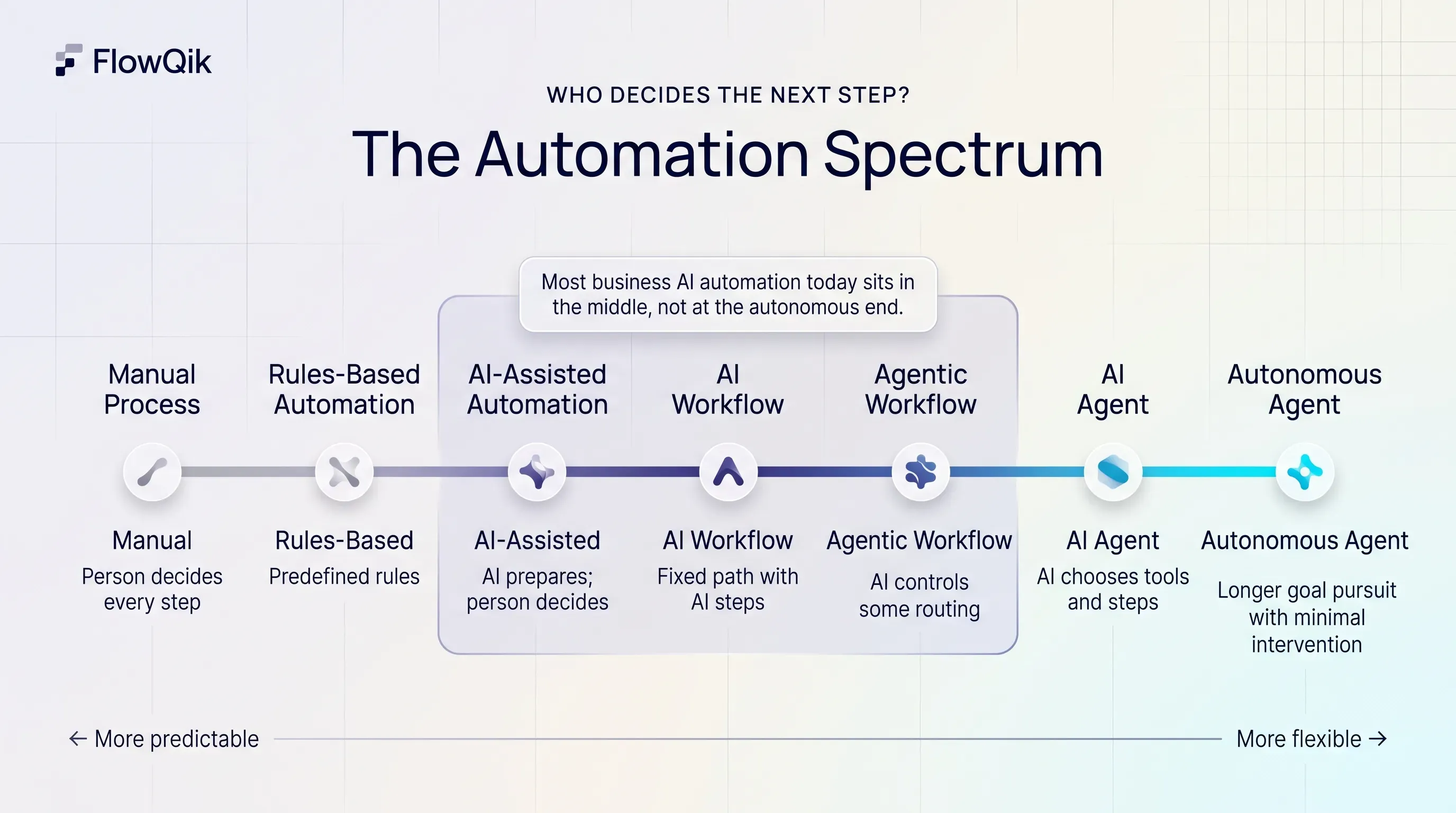
Much of the confusion around AI automation comes from vendors using "automation," "workflow," "agent," and "autonomous" loosely, sometimes for the same feature. A clearer way to separate them is to ask one question: who decides the next step?
Anthropic's guidance on building effective agents draws the line this way: workflows are "systems where LLMs and tools are orchestrated through predefined code paths," while agents are "systems where LLMs dynamically direct their own processes and tool usage." OpenAI's practical guide to building agents makes a similar point from the other side, noting that applications which use an LLM without letting it control workflow execution, such as single-turn calls or sentiment classifiers, are not agents.
| Approach | Who decides the next step | Flexibility | Typical use |
|---|---|---|---|
| Manual process | A person, every time | High, but slow and inconsistent at volume | Rare, high-stakes, or one-off work |
| Rules-based automation | Predefined rules | Low; handles only anticipated cases | Structured, repetitive tasks |
| AI-assisted automation | Rules, with AI preparing output for a person to act on | Moderate; a person makes the call | Drafts, summaries, recommendations |
| AI workflow automation | A fixed path designed by people, with AI steps inside it | Moderate to high within a set structure | Triage, extraction, routing, reporting |
| Agentic workflow | A designed structure in which the model controls some routing, planning, or tool choices | High within defined boundaries | Multi-step tasks where the path varies case by case |
| AI agent | The model chooses tools and steps to complete a bounded goal | High; less predictable | Open-ended research, complex support cases |
| Autonomous agent | The model plans and acts over longer periods with minimal intervention | Highest; least predictable | Long-running goals with strong safeguards |
Most of what businesses call AI automation today sits in the AI-assisted and AI workflow rows. The path is designed in advance, and the model fills in judgment at specific points.
Does AI Automation Require An AI Agent?
No. An AI automation becomes an agent only when the model is given control over which steps to take and which tools to use. Both Anthropic and OpenAI recommend starting simpler. Anthropic advises finding "the simplest solution possible" and adding complexity only when needed, noting that agentic systems often trade latency and cost for better task performance. OpenAI suggests agents are best suited to work involving complex judgment, rule sets that have become hard to maintain, or heavy reliance on unstructured data, and that otherwise "a deterministic solution may suffice."
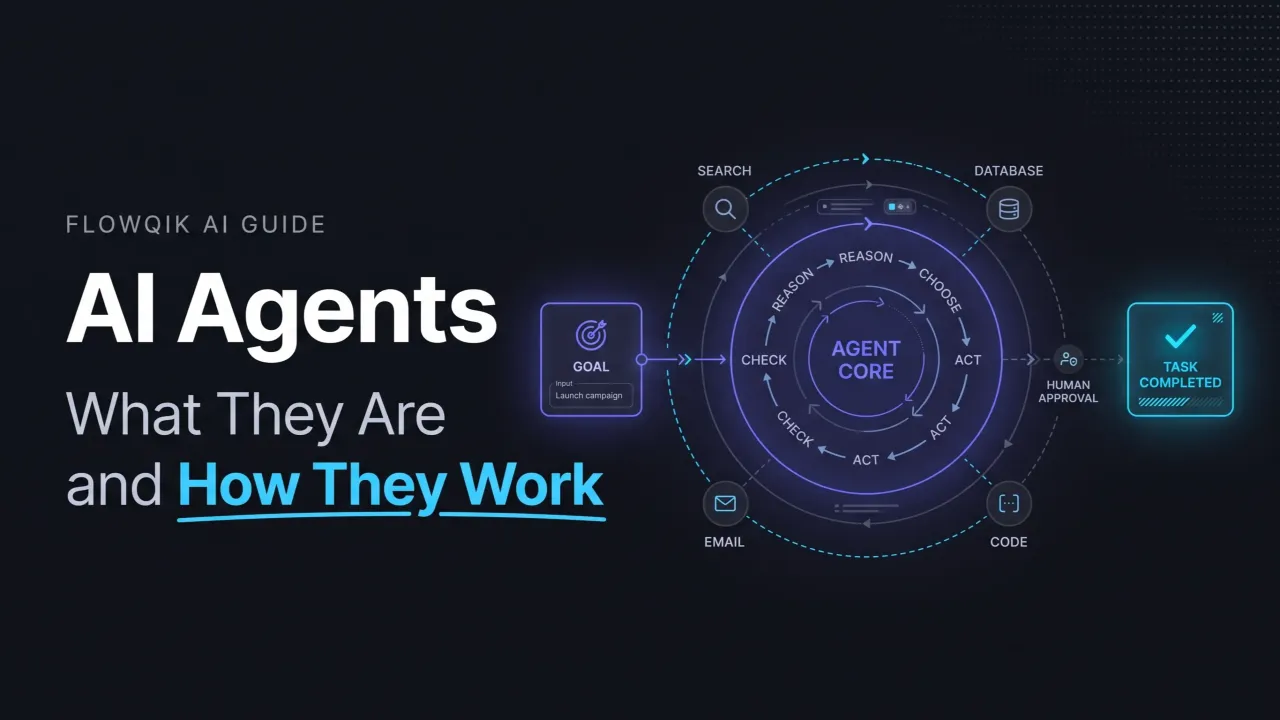
If you want to understand how agents plan, use tools, and operate within limits, FlowQik's AI agents guide covers that in depth. Workflows that give AI more control over routing and orchestration are explained in the agentic workflows guide, and systems at the far end of the spectrum are covered in the guide to autonomous AI agents.
Benefits Of AI Automation You Can Realistically Expect
The benefits of AI automation are real, but they depend heavily on the process, the quality of the data, and how much review the output needs. Vendor-reported savings vary widely and rarely transfer directly from one business to another, so the most reliable approach is to measure your own baseline before automating and compare afterward.
It reaches work that rules could not. The clearest benefit is extending automation to tasks built on unstructured input, such as emails, documents, transcripts, and free-text forms. These tasks previously required a person to read and interpret every item.
It shortens handoffs. Many processes are slow not because the work is hard but because items wait in inboxes for someone to sort them. Automated classification and routing can move work to the right person as soon as it arrives.
It helps capacity keep pace with volume. Interpretation steps that once scaled directly with headcount can absorb more volume. Review, exception handling, and maintenance still require people, so capacity improves without becoming unlimited.
It produces cleaner downstream data. When every incoming request is categorized and every document is extracted into consistent fields, reporting and analysis improve, even in the parts of the business that never touch the automation.
It supports better decisions. Summaries, risk flags, and prioritization give people a faster starting point. In decision-support mode, the benefit comes without handing the decision itself to the model.
It makes processes measurable. Because every run is logged, teams can see volumes, error rates, and bottlenecks that were invisible when the work lived in individual inboxes.
Limitations And Risks Of AI Automation
AI automation introduces risks that conventional automation does not have. None of them makes it unusable, but each needs a deliberate answer in the design.
Reliability
Models can confabulate, returning plausible content that is wrong, and the same input can produce different outputs across runs. Ambiguous input, such as an email that asks two unrelated questions or a scanned document with poor image quality, increases both problems. The most dangerous version is the silent failure: output that looks correct, passes basic format checks, and flows into a business system unnoticed. Bias is a related concern; Microsoft notes that outputs depend on high-quality, representative data, which matters most when automations affect customers or employees.
Data, Privacy, And Security
Data quality determines output quality, and many organizations discover during their first project that the records an automation depends on are incomplete or inconsistent. Privacy is a separate question: sending customer or employee data to an external model provider requires checking that provider's data handling terms and your own obligations.
Security risks are specific to AI. The OWASP Top 10 for LLM Applications ranks prompt injection as its first risk for 2025. Injection can be direct, where someone types instructions meant to override the system, or indirect, where instructions hidden in an email, webpage, or file are processed as part of the input. OWASP notes there may be no foolproof prevention, which is why its recommended mitigations include least-privilege access, separating untrusted content, and human approval for privileged actions. An automation that reads external emails and can also send payments is exactly the combination to avoid without safeguards.
Cost, Latency, And Maintenance
Each AI step adds per-run cost and processing time, which matters at high volume or in processes where speed is the point. Integrations break when APIs change or credentials expire. Model providers update and retire models, and a new version may behave differently with the same instructions, so automations need periodic retesting. Building and maintaining these systems also takes skills that many small teams are still developing.
When AI Adds Complexity Instead Of Removing It
AI automation can make a process harder to run than the manual version it replaced. This tends to happen when the underlying process is unclear or inconsistent, when nobody can define what a correct output looks like, when exceptions are so frequent that most items end up in review anyway, or when the cost of reviewing AI output exceeds the cost of doing the task directly. Automating a broken process usually produces a faster broken process.
Human Oversight And Governance
Human oversight is not a sign that an automation failed. It is a design component, and the right amount depends on the cost of an error. Several oversight patterns are common:
- Approve before action: A person reviews AI output before any external or irreversible step, such as sending a customer reply or posting a payment.
- Review by exception: Outputs that fail validation, fall outside expected ranges, or are marked uncertain go to a person, while routine cases proceed.
- Sampled audits: A regular sample of completed runs is checked by a person to measure accuracy and catch slow drift.
- Escalation triggers: The automation hands off when it repeatedly fails to understand an input or when the next action is high risk. OpenAI's agent guide names exceeding failure thresholds and high-risk actions as the two main triggers for human intervention.
Governance gives oversight a structure. At a practical level it means each automation has a named owner, documented data and permission boundaries, logs that show what happened on every run, and a change process for prompts, models, and rules. OWASP recommends enforcing authorization in the downstream systems themselves rather than relying on the model to decide whether an action is allowed.
For organizations that want a formal reference, the NIST AI Risk Management Framework organizes AI risk work around four functions: Govern, Map, Measure, and Manage. Its Generative AI Profile lists risks such as confabulation, data privacy, information security, and harmful bias that map closely to the concerns above. Regulations may also apply depending on where you operate and what the automation decides, particularly in employment, credit, and other decisions about individuals.
Implementing AI Automation: The Main Stages
Implementation follows a predictable progression. The table summarizes the stages at a planning level; the detailed build methodology belongs in a workflow-specific guide.
| Stage | Main question | Key output |
|---|---|---|
| 1. Process selection | Which process is frequent, painful, and suitable for AI? | One well-scoped candidate process |
| 2. Process mapping | How does the work happen today, including exceptions? | A current-state map and real input samples |
| 3. Placing the AI | Which specific steps need interpretation, and which can stay as rules? | A design showing AI steps, rules, and review points |
| 4. Guardrails and success criteria | What does a correct output look like, and what must never happen? | Validation rules, permission limits, accuracy targets |
| 5. Prototype | Does the AI step work on real examples? | A working draft tested on historical data |
| 6. Testing and evaluation | How accurate is it across normal cases and edge cases? | Measured results on a representative test set |
| 7. Controlled deployment | How do we go live without unacceptable risk? | Launch in review or decision-support mode, then expand |
| 8. Monitoring and improvement | Is it still working, and where does it fail? | Logs, sampled audits, and a regular update cycle |
Three stages deserve extra emphasis. Process selection is where most projects succeed or fail; a frequent, well-understood process with varied input and a checkable result is a far better first candidate than a rare, high-stakes one. Defining success criteria before building forces the question of what "correct" means, which is often harder than expected and is what makes later testing possible. Controlled deployment, such as running the automation alongside the existing manual process or keeping a person in the approval step at first, allows accuracy to be measured on live data before the AI acts on its own.
When you are ready to move from planning to building, the AI workflow automation guide covers workflow design in detail, and the best AI automation tools guide compares the platforms used to implement it.
Is AI Automation The Right Fit For Your Process?
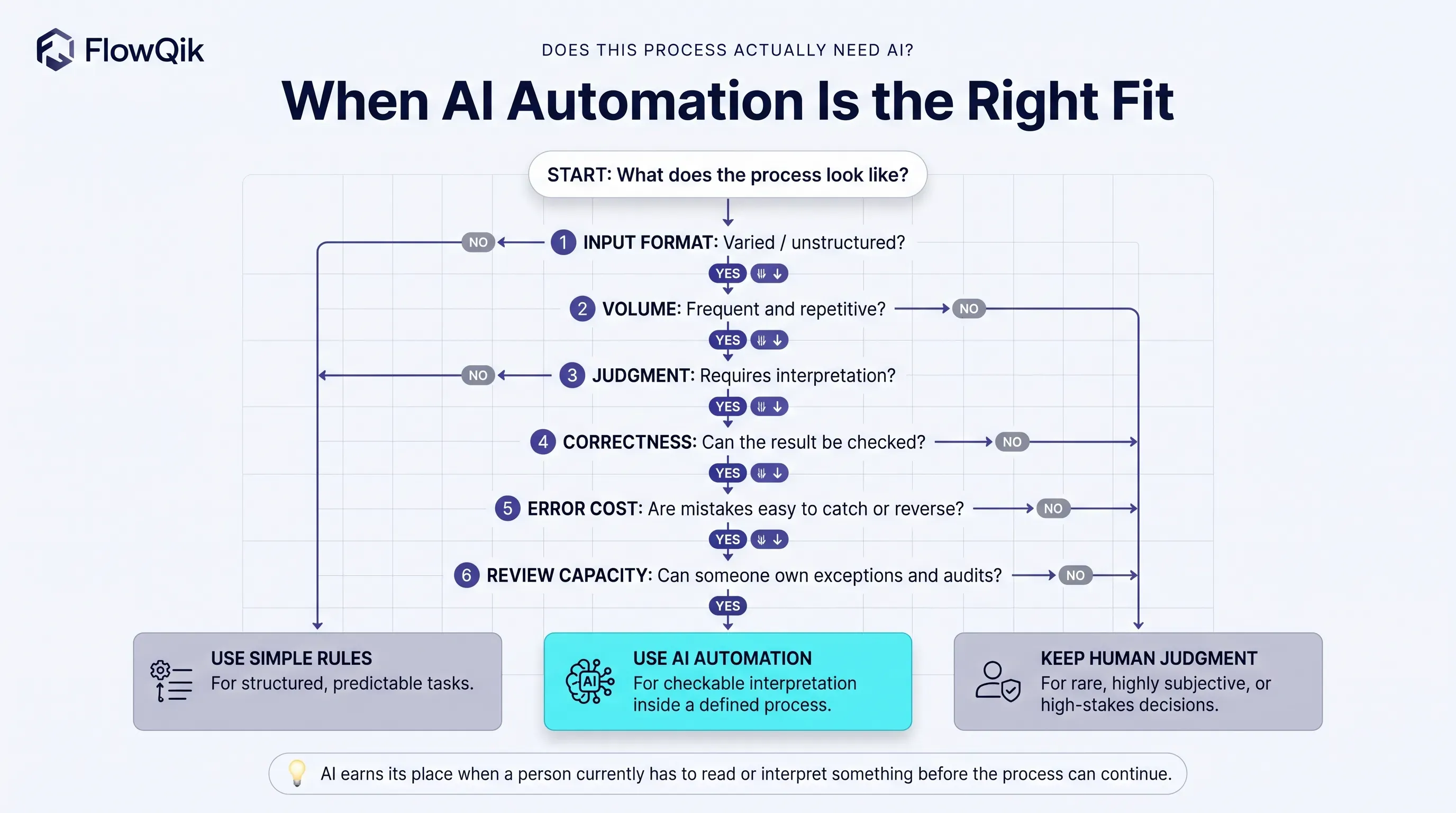
Not every process benefits from AI. The characteristics below help separate good candidates from processes better served by conventional automation or by people.
| Process characteristic | Favors AI automation | Favors rules or manual work |
|---|---|---|
| Input format | Varied, unstructured, or written in natural language | Consistent and structured |
| Volume | Frequent and repetitive | Rare or one-off |
| Judgment required | Interpretation within clear categories | None (use rules) or deep expertise and accountability (keep people) |
| Definition of correct | Clear enough to check | Subjective or impossible to verify |
| Error tolerance | Errors are cheap and easy to catch | Errors are costly or irreversible |
| Regulatory sensitivity | Low, or manageable with human review | High-stakes decisions about people, money, or legal outcomes without review capacity |
| Review capacity | Someone can own exceptions and audits | Nobody is available to review output |
Simple automation is enough when the input is structured and the correct action can be written as a rule. Moving form submissions into a CRM, sending scheduled reminders, syncing records between apps, and generating invoices from completed orders all fit that description. Adding AI to these processes adds cost and variability without adding capability.
AI automation earns its place when a person currently has to read, interpret, or summarize something before the process can continue, and when the result of that interpretation can be checked. Processes that need open-ended judgment across many steps may eventually warrant an agent, but most organizations get more value from well-designed AI workflows first.
Choosing Your Next Step In AI Automation
The most useful next step depends on what you need to decide. If you are mapping a specific process and want to design the workflow, including triggers, AI steps, error paths, and review points, continue with the AI workflow automation guide. If you have identified a candidate process and want to compare platforms, the best AI automation tools guide covers the main options and how they differ.
If your interest is in systems that choose their own steps, start with the AI agents guide, then move on to agentic workflows and autonomous AI agents as the level of autonomy increases.
Whichever direction you take, the principle from this guide still applies: use rules wherever rules work, add AI only where interpretation is required, and design validation and human review around the cost of being wrong.
Discussion
Comments
No approved comments yet. Be the first to join the discussion.