
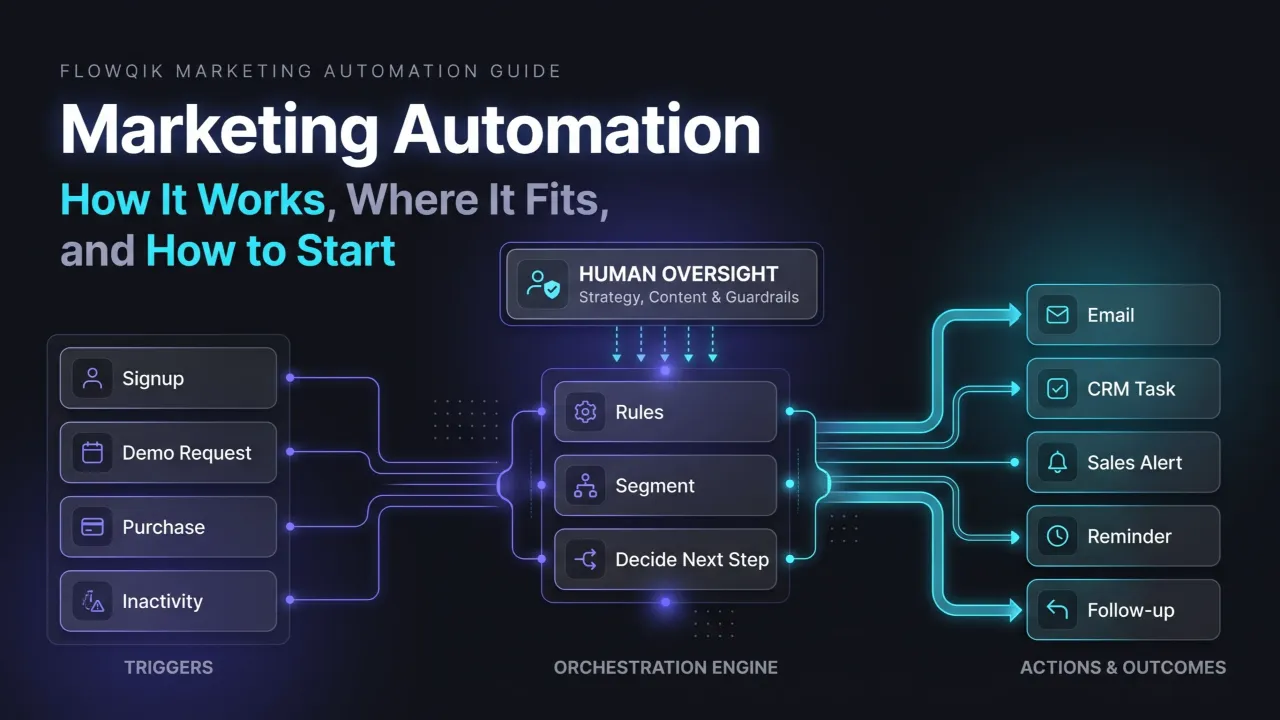
Marketing automation is the use of software, customer data, and predefined rules to run repetitive marketing actions automatically, usually in response to something a person does or a date that arrives. A signup triggers a welcome message. A demo request creates a sales task. A customer who has gone quiet for 90 days receives a different message than one who bought last week. The software handles the timing and the execution, while your team decides who should receive what, why, and when.
That last part matters more than most introductions admit. Marketing automation does not replace strategy, audience understanding, content, or judgment. It takes a process you have already thought through and runs it consistently at a scale people cannot match by hand. A good process gets more reliable. A weak one gets louder.
This guide explains how marketing automation actually works, where it fits in the customer lifecycle, which channels it can coordinate, what a marketing automation campaign looks like from trigger to measurement, and how to implement it in stages without creating a tangle of workflows nobody understands. It also covers the parts competitors tend to skip: data quality, over-automation, consent, and maintenance.
What Marketing Automation Means In Practice
In plain terms, marketing automation answers one question over and over: when this happens, for this kind of person, what should we do next?
Platforms describe it in similar ways. Salesforce defines it as technology that manages marketing processes and multichannel campaigns automatically. HubSpot frames it as software that automates repetitive marketing tasks so teams can deliver personalized experiences at scale. Mailchimp emphasizes running predetermined campaigns across channels based on customer behavior, preferences, and purchase activity. The common thread is not "sending emails automatically." It is using data about a person to decide which action happens next, across whichever channels the business uses.
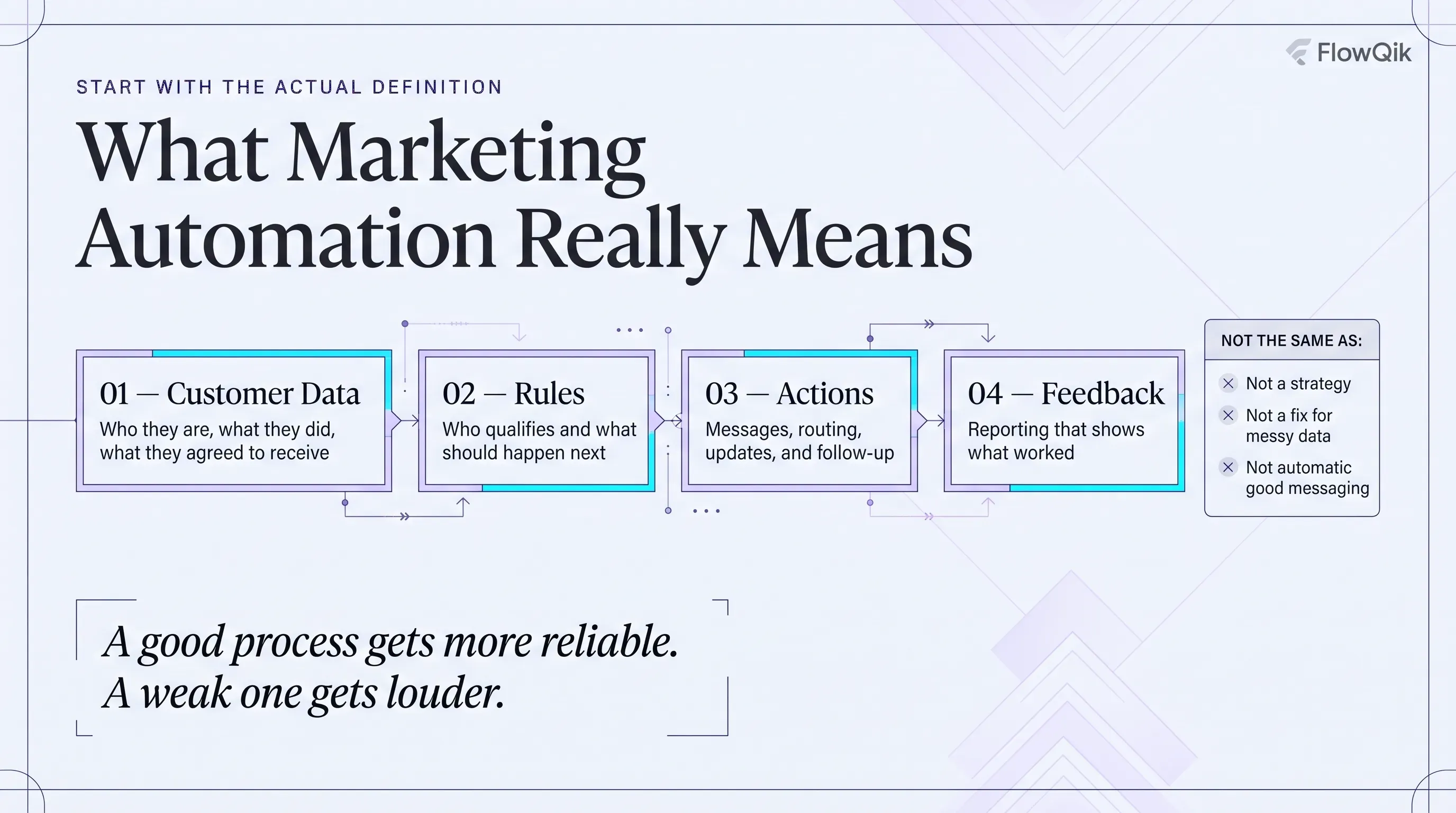
A practical definition has four parts:
- Data about contacts and customers (who they are, what they did, what they agreed to receive)
- Rules that decide who qualifies for an action
- Actions across channels and internal systems
- Feedback in the form of reporting that shows whether the actions worked
What marketing automation is not is equally useful to understand. It is not a strategy by itself, it does not write good messages for you, and it does not fix messy customer data. Some platforms now add AI features such as suggested send times, generated copy, or predictive scores, but those features still depend on the same foundation: clean data, clear goals, and someone reviewing what the system does.
How It Differs From Manual Campaign Work, CRM, And Email Marketing
Three comparisons come up constantly, and each clears up a common misunderstanding.
| Comparison | The short distinction |
|---|---|
| Marketing automation vs manual campaign management | Manual marketing depends on a person initiating each send, update, or follow-up. Automation executes predefined or trigger-based actions without someone pressing "go" each time. |
| Marketing automation vs CRM | A CRM primarily stores and organizes customer and prospect records, deals, and sales activity. Marketing automation uses that data (plus behavioral data) to trigger and coordinate marketing actions. Many platforms combine both. |
| Marketing automation vs email marketing | Email is one channel inside marketing automation. Automation can also coordinate SMS, ad audiences, website content, CRM updates, lead routing, and sales tasks. |
The CRM distinction trips up a lot of teams. A CRM tells you that a lead exists and what stage it is in. Marketing automation is what notices that the lead just viewed your pricing page three times, raises their score, and alerts the account owner. The two work best when connected, because automation without CRM data is guessing, and a CRM without automation depends on people remembering to follow up.
How Marketing Automation Works: The Building Blocks
Every automation, from a two-step welcome message to a multi-month nurture program, is built from the same small set of components. Learning these makes any platform easier to understand, because vendors mostly differ in what they call them.
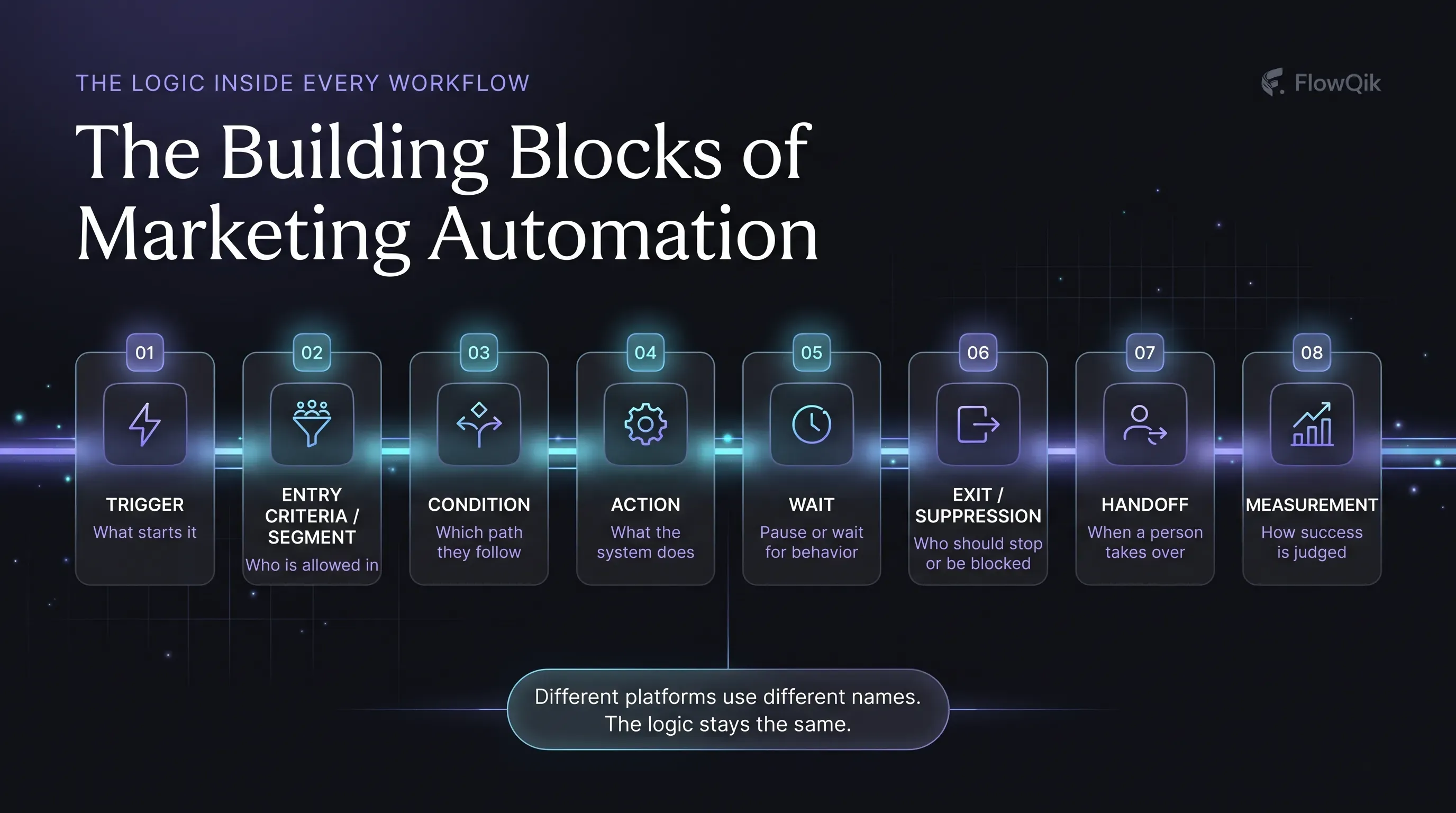
| Component | Role | Example |
|---|---|---|
| Trigger | The event that starts the automation | A visitor submits a demo request form |
| Entry criteria / segment | Who is allowed to enter | Only contacts in North America with a business email |
| Condition | A rule that decides which path a contact follows | If company size is over 200 employees, route to enterprise path |
| Action | Something the system does | Send a confirmation, create a CRM task, add a tag |
| Wait | A pause, either fixed or until something happens | Wait two days, or wait until the contact opens the guide |
| Exit / suppression | What removes or blocks someone | Contact books a meeting, unsubscribes, or becomes a customer |
| Handoff | Where a person takes over | Notify a sales rep when the lead shows buying intent |
| Measurement | How you judge the outcome | Meetings booked from the workflow within 30 days |
Mailchimp's journey builder is a useful illustration of how platforms implement this. Its flows have triggers that add contacts, rules (such as conditional splits and time delays) that control movement along a path, actions (such as sending an email, tagging a contact, or calling a webhook), and exit conditions that remove contacts from the flow. Other tools use words like "enrollment," "branch," "step," or "goal," but the logic is the same.
Triggers That Start An Automation
Triggers fall into a few families:
- Behavioral: form submission, newsletter signup, content download, page visit, product view, cart abandonment, email click, event registration or attendance
- Transactional: purchase, renewal, subscription change, refund
- Data changes: a lifecycle stage moves from lead to opportunity, a CRM field updates, a lead score crosses a threshold
- Product activity: a trial user completes setup, or fails to log in for a set period
- Time or date: a birthday, contract anniversary, renewal date, or recurring schedule
- Inactivity: no opens, visits, or purchases over a defined window
Inactivity triggers deserve special mention because they are easy to overlook. Most automation reacts to what people do. Some of the most useful automation reacts to what people stop doing.
Conditions Decide What Happens Next
A trigger tells the system that something happened. Conditions decide what to do about it. Common conditions include audience segment, customer stage, geography, product ownership, engagement level, lead status, and consent status.
Consider two people who download the same guide. One is an existing customer on your largest plan; the other is a first-time visitor from a target industry. The trigger is identical, but the right next step is completely different. Without conditions, both receive the same generic follow-up, and at least one of them receives something irrelevant.
Exit Rules: The Part Most Teams Forget
The most common automation failure is not a missing message. It is a message that should have stopped. A prospect books a demo and keeps receiving "Ready to see a demo?" emails. A customer completes a purchase and still gets the abandoned-cart reminder. Exit rules (stop when the goal is reached) and suppression rules (never send this to people who match X) protect the customer experience more than any clever personalization.
Where Automation Fits In The Customer Lifecycle
A lifecycle view is the most practical way to decide what to automate, because it ties each automation to a customer need rather than to a feature in your software. The table below maps typical goals and example automations by stage.
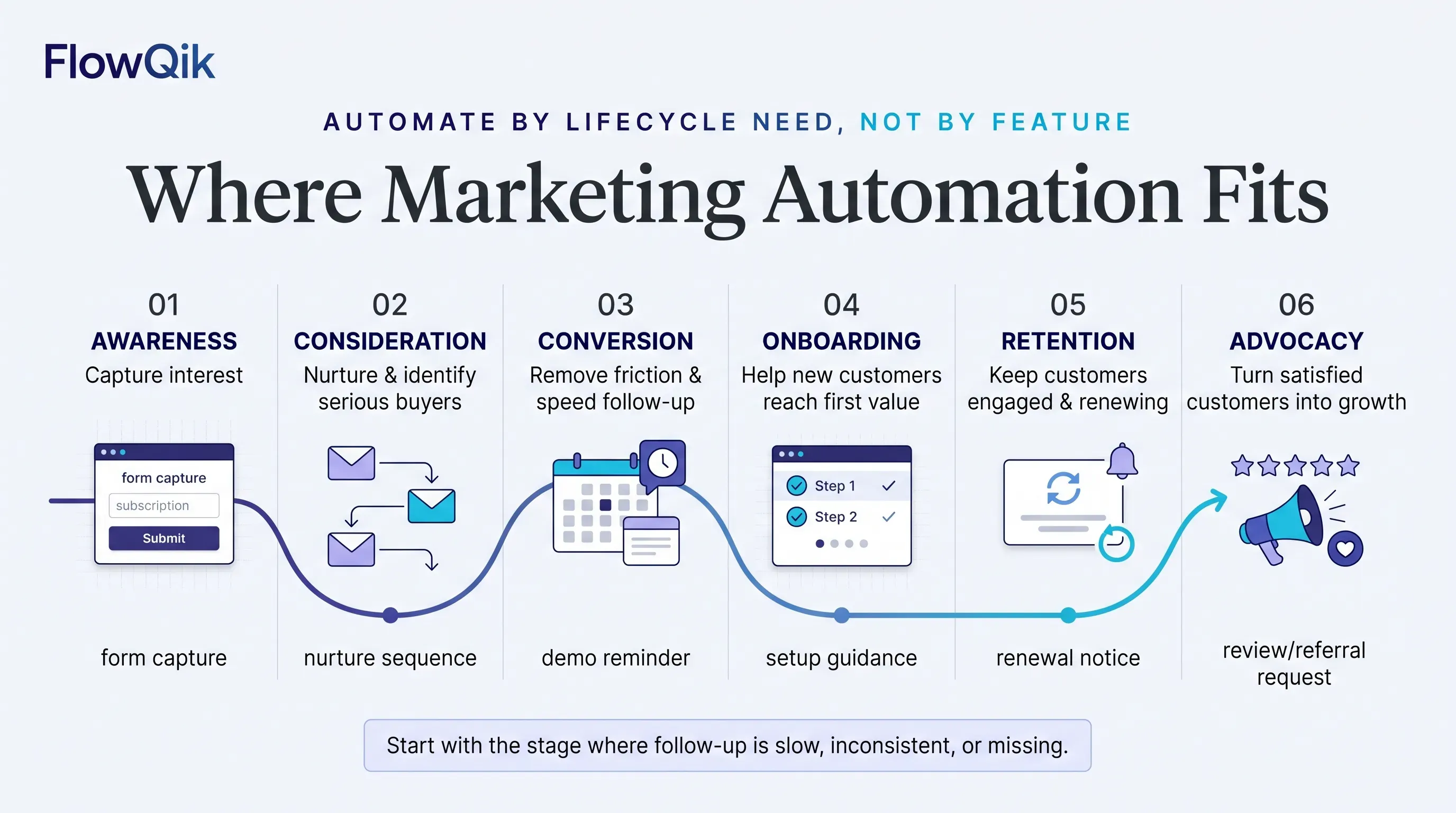
| Lifecycle stage | Typical goal | Example automation |
|---|---|---|
| Awareness | Capture interest and learn who the person is | Form capture that records lead source and sends the requested resource |
| Consideration | Help prospects evaluate and identify serious buyers | Behavior-based nurture content, lead scoring, segmentation by interest |
| Conversion | Remove friction and get timely follow-up | Demo confirmation and reminders, sales alert on high intent, cart or form abandonment reminder |
| Onboarding | Help new customers reach first value | Welcome sequence, setup guidance triggered by product activity |
| Retention | Keep customers engaged and renewing | Usage reminders, renewal notices, re-engagement for inactive customers |
| Advocacy | Turn satisfied customers into a source of growth | Review requests after a positive milestone, referral invitations, feedback surveys |
Not every business needs automation at every stage. A local service business may get the most value from appointment reminders and review requests. A B2B software company may depend heavily on consideration and onboarding. An online store may focus on cart recovery, post-purchase follow-up, and reactivation. Start with the stage where follow-up is currently slow, inconsistent, or missing, not with the stage that has the most interesting templates.
Channels Marketing Automation Can Coordinate
Marketing automation is often equated with email, but the more useful view is that it coordinates actions across several channels and internal systems from one set of rules.
Email remains the most common channel because it is owned, inexpensive per message, and well supported by every platform. It is ideal for longer content, confirmations, nurture content, and onboarding. Deeper topics such as sequence design and deliverability belong in a dedicated guide; see Email Marketing Automation.
SMS and messaging apps work best for short, time-sensitive messages: appointment reminders, delivery updates, event-day notices, or a limited-time offer to people who explicitly opted in. They carry stricter consent expectations in many jurisdictions, so they should be used selectively.
Push and in-app messages suit mobile apps and software products, where an action inside the product (or the lack of one) is the best signal of what a user needs next.
Website, forms, and landing pages are both trigger sources and channels. Forms capture data that feeds automation, and some platforms can change website content based on segment or lifecycle stage.
CRM and sales tasks are an internal channel that is easy to forget. Automation can assign leads, create follow-up tasks, update lifecycle stages, and alert reps. For many B2B teams, this is where automation delivers the most visible value.
Paid advertising audiences can be synced from segments, so you can suppress existing customers from acquisition ads or show different ads to people at different stages.
Social media automation is mostly scheduling and, in some tools, routing messages or capturing leads. It plays a supporting role rather than driving lifecycle journeys.
Direct mail is available through integrations in some platforms, typically for high-value moments such as a post-demo package or a renewal reminder for key accounts.
The point of coordinating these channels is not to reach people in more places. It is to choose the right channel for the moment and avoid sending the same message everywhere at once.
Segmentation And Personalization: Deciding Who Gets What
Segmentation is the foundation of useful marketing automation. Without it, automation simply sends the same message to more people faster.
Useful segmentation criteria vary by business model:
- Who they are: firmographics such as industry, company size, and role for B2B; demographics or location for B2C where relevant
- Where they are: lifecycle stage, lead status, customer versus prospect
- What they did: pages viewed, content downloaded, products purchased, events attended
- How engaged they are: recent opens, clicks, logins, or visits, and the absence of them
- Where they came from: lead source or campaign
- What they are worth: customer value, plan tier, or account type
A practical rule: segment before you automate. If you cannot describe in one sentence who should enter an automation and who should be excluded, the automation is not ready.
Personalization is what you do with segments. It can be as simple as using a name, or as substantial as showing content based on product interest, industry, or the last action a person took. More personalization is not automatically better. Personalization based on stale or wrong data ("Welcome back, Customer!") damages trust faster than a well-written generic message. And personalization that reveals more tracking than the person expected can feel intrusive. The useful test is relevance: would this person reasonably expect you to know this, and does using it make the message more helpful?
Lead Nurturing And Lead Scoring
Lead nurturing is the coordinated set of communications and actions that help a prospect move from initial interest toward a buying decision. In automated form, it usually combines educational content delivered over time, follow-up that responds to behavior, messaging that becomes more specific as interest grows, and a clear handoff to sales when the prospect is ready.
Good nurturing is responsive rather than fixed. A purely time-based series sends message three on day six regardless of what the person did. A behavior-aware nurture notices that the person read the pricing comparison and skips ahead, or notices they ignored everything and changes the approach (or stops).
Lead scoring assigns points to signals so teams can prioritize. Inputs typically include fit (industry, company size, role) and engagement (website visits, content engagement, email activity, event attendance), plus strong buying signals such as a pricing page visit or a demo request. When a score crosses an agreed threshold, automation can route the lead to sales or change the nurture path.
Lead scoring is a prioritization tool, not an objective truth. Scores reflect the assumptions of whoever built the model, and they drift as your market, content, and tracking change. The most important part of scoring is not the point values; it is agreement between marketing and sales on what "sales ready" means and a regular review of whether high-scoring leads actually convert.
What A Marketing Automation Campaign Looks Like
A marketing automation campaign is a goal-driven program that uses one or more automated workflows to move a defined audience toward an outcome. The workflow is the logic; the campaign is the goal, audience, content, and measurement wrapped around it.
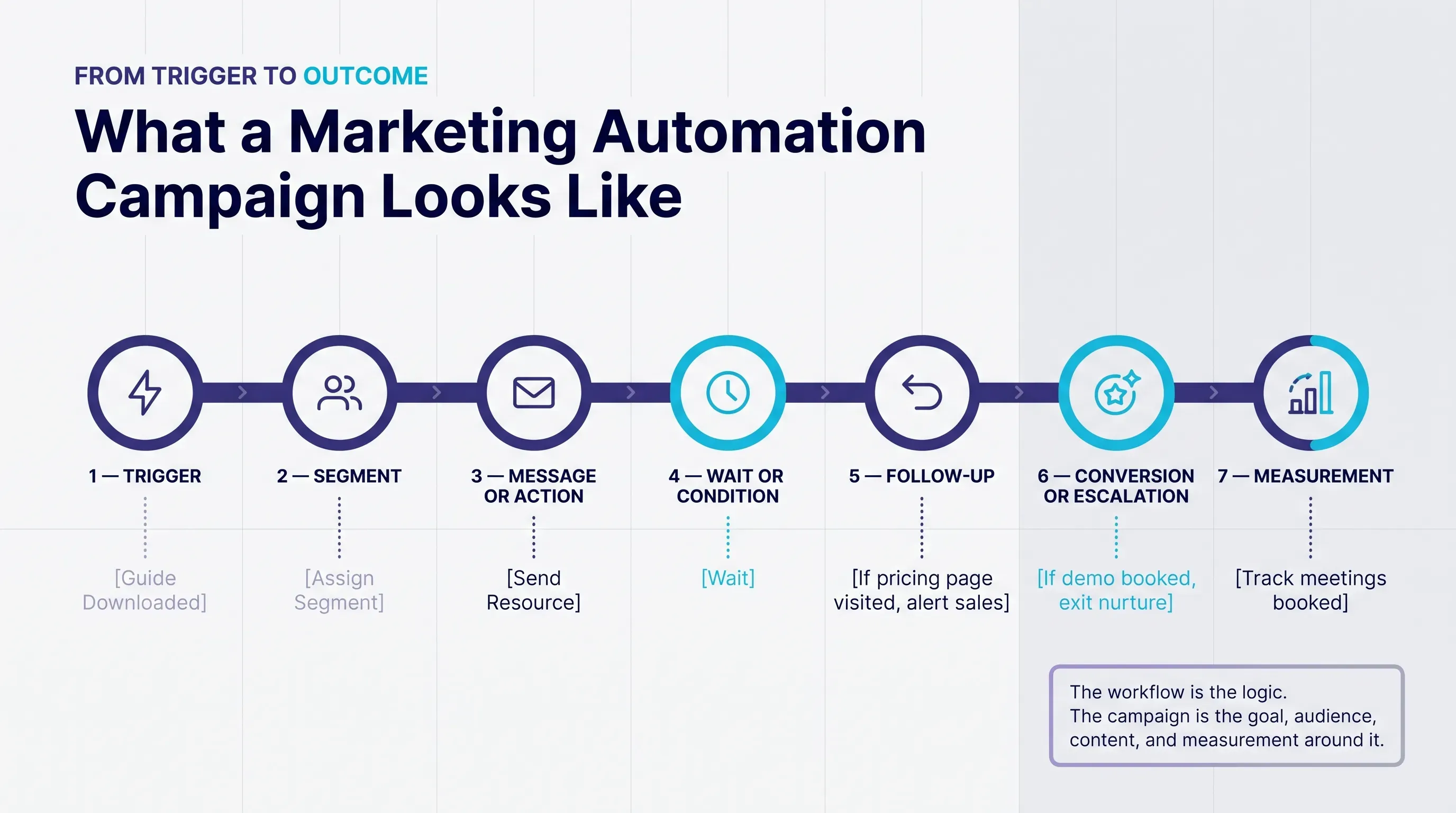
Most campaigns follow a recognizable shape:
trigger → segment → message or action → wait or condition → follow-up → conversion or escalation → measurement
Here is a hypothetical example to show the shape in practice.
A prospect downloads a guide on choosing project management software. The automation records the lead and lead source in the CRM, assigns a segment based on company size and role, and sends the requested guide immediately. It then waits several days. If the person engages with related content, they receive a comparison checklist; if they visit the pricing page, their lead score rises and the assigned rep receives a task with the context of what they viewed. If they book a demo at any point, they exit the nurture path and enter a demo confirmation flow instead. If they show no engagement at all, the campaign ends quietly rather than continuing indefinitely. The campaign is measured on meetings booked and opportunities created from the audience, not on email opens.
Other representative campaigns follow the same structure with different triggers and goals:
- Welcome campaign: triggered by signup; goal is first meaningful engagement
- Webinar follow-up campaign: triggered by registration and attendance status; attendees and no-shows receive different follow-up
- Abandoned-cart campaign: triggered by an unfinished checkout; ends immediately on purchase
- Onboarding campaign: triggered by account creation; steps respond to what the user has or has not set up
- Re-engagement campaign: triggered by inactivity; ends with either renewed engagement or a decision to stop messaging
Common Workflows Worth Knowing
Workflows are the reusable patterns inside campaigns. A handful cover most of what organizations automate first:
- Welcome workflow for new subscribers or customers
- Content download follow-up that delivers the asset and suggests a relevant next step
- Lead routing that assigns new leads to the right owner based on territory, size, or product
- Event registration follow-up with reminders and post-event paths
- Trial or customer onboarding that reacts to product activity
- Inactive-customer re-engagement
- Review or feedback request after a positive milestone
- Renewal reminder ahead of a contract or subscription date
Each of these looks simple on a whiteboard and gets more nuanced in practice, especially around branching, timing, and exit rules. Step-by-step designs for these patterns are covered in Marketing Automation Workflows.
Marketing Automation Strategies That Hold Up In Practice
Many "marketing automation strategies" lists repeat generic advice. The principles below are the ones that most directly change whether automation helps or hurts.
Automate around lifecycle needs, not features. Begin by asking where customers or prospects currently wait too long, fall through the cracks, or receive inconsistent treatment. Then automate that gap. Choosing automations because the platform makes them easy tends to produce activity without outcomes.
Prioritize high-volume, repeatable processes. The best early candidates happen often, follow predictable rules, and are currently done inconsistently by hand. Lead follow-up and onboarding usually qualify. A once-a-year partner campaign usually does not.
Use behavioral triggers where they add relevance. Time-based messages are fine for scheduled moments such as renewals. For everything else, a signal from the person (a visit, a click, a product action, or inactivity) usually produces more relevant timing than an arbitrary delay.
Coordinate marketing and sales explicitly. Agree on lifecycle stage definitions, scoring thresholds, handoff rules, and what sales should do with a routed lead. Automation that hands off leads nobody follows up on creates a worse experience than no automation at all.
Keep a human escalation path. Every automation that touches a buying decision, a complaint, a cancellation, or a sensitive situation should have a clear point where a person takes over.
Prefer simple workflows you can explain. A three-branch workflow that everyone understands usually outperforms a twenty-branch workflow that only its original builder can maintain. Complexity hides errors, makes testing harder, and slows down every future change.
Test incrementally and measure business outcomes. Change one variable at a time (timing, message, condition) and judge results by the outcome the automation exists for, not by the easiest metric to report.
Review and retire automations on a schedule. Products, offers, and pages change. Automations keep running regardless. A quarterly review of what is live, what it sends, and whether it still makes sense prevents "automation debt" from accumulating.
How To Implement Marketing Automation In Stages
The most reliable way to implement marketing automation is one well-scoped workflow at a time. The framework below is a practical sequence rather than a rigid methodology; small teams can move through it in days for a simple workflow.
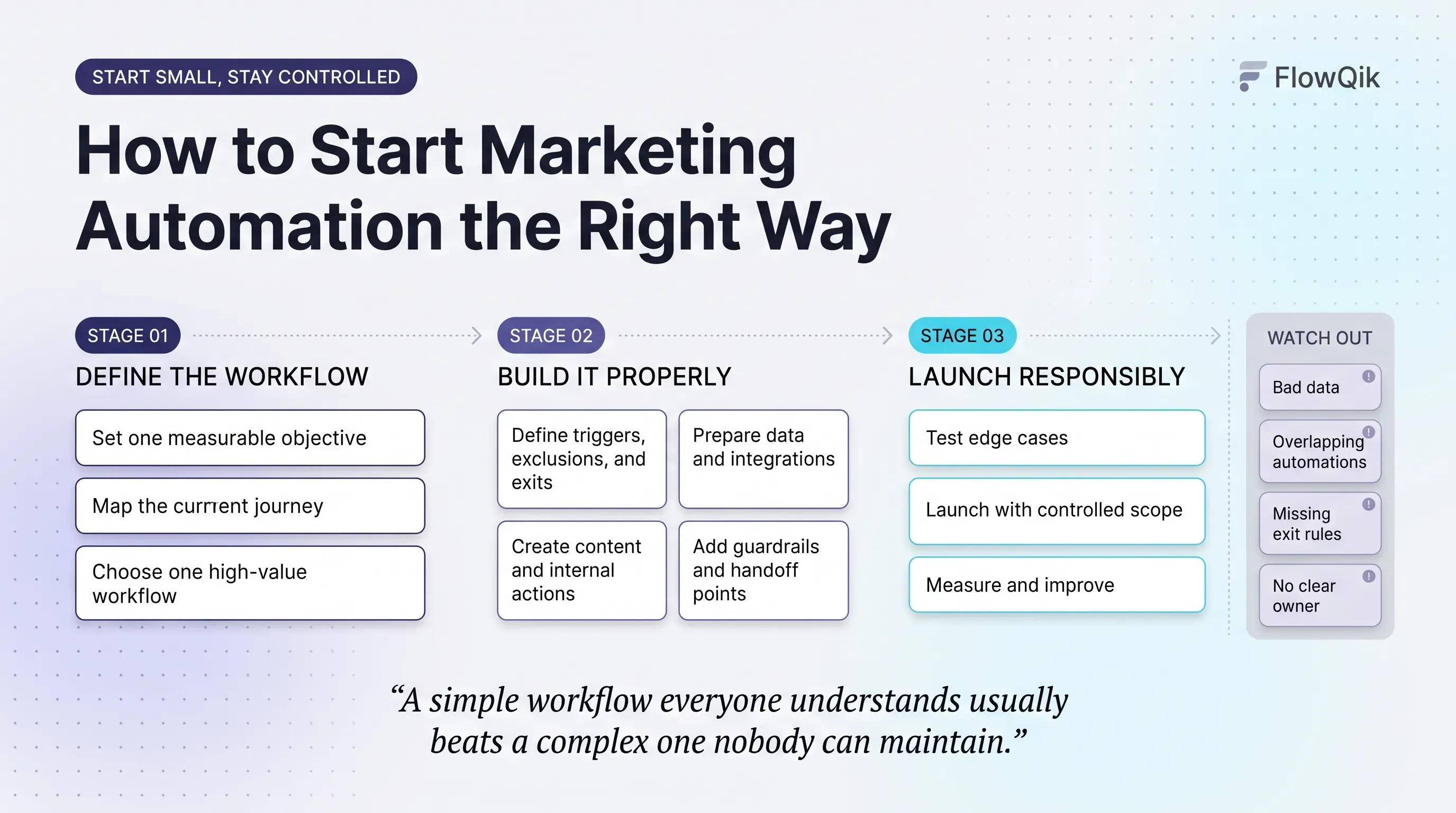
| Stage | Main question | Output |
|---|---|---|
| 1. Define the objective | What specific problem should this solve? | One measurable goal (for example, respond to every demo request within one business hour) |
| 2. Map the current journey | Where are the manual handoffs and gaps today? | A simple map of current steps, owners, and delays |
| 3. Choose one high-value workflow | Which gap is frequent, repeatable, and costly? | A single workflow to build first |
| 4. Define triggers and audience rules | Who enters, when, and who is excluded? | Entry criteria, exclusions, and exit rules in writing |
| 5. Prepare data and integrations | Is the data needed actually available and reliable? | Verified fields, form mappings, CRM sync, consent records |
| 6. Create messages and actions | What does the contact receive, and what happens internally? | Final content, tasks, routing, and notifications |
| 7. Add conditions and guardrails | What could go wrong or conflict? | Suppression rules, frequency limits, human handoff points |
| 8. Test | Does it behave correctly for every path? | Tested logic, personalization fallbacks, links, timing, and edge cases |
| 9. Launch with controlled scope | How do we limit the damage if something is wrong? | Live workflow, possibly for one segment first |
| 10. Measure and improve | Is it achieving the objective? | A baseline, a review date, and a list of changes to test |
Two stages deserve extra attention. Stage 5 is where most projects slow down, because it is where teams discover duplicate contacts, missing fields, and forms that do not map to the CRM. Fixing those issues first is cheaper than debugging an automation that behaves strangely because of them. Stage 8 should include deliberately awkward test cases: a contact with no first name, a customer who is also an open lead, someone who unsubscribes mid-sequence, and someone who converts on day one.
What You Need Before You Start
Before building the first automation, confirm you have:
- A clear owner for the workflow and for the data it depends on
- A contact record you trust, with key fields (lifecycle stage, lead source, consent status) consistently populated
- Forms and tracking that capture the events your triggers depend on
- Agreed definitions of lifecycle stages and, if relevant, sales handoff criteria
- Content for each step, plus a fallback for missing personalization data
- A documented way for contacts to opt out and a process that honors it
Choosing the software itself is a separate decision. If you are at that point, Best Marketing Automation Platforms compares options; this guide intentionally stays tool-neutral.
Measuring Marketing Automation
Marketing automation is easy to measure badly. Platforms report opens and clicks by default, and those numbers are tempting because they arrive quickly. But no single metric proves that an automation works. A useful measurement approach starts from the objective and selects metrics from several layers.
| Objective | Useful metrics |
|---|---|
| Engagement | Click rate, reply rate, content engagement, open rate (directional only) |
| Conversion | Form completions, demo bookings, purchases, lead-to-opportunity conversion |
| Lifecycle progress | Nurture progression, trial activation, retention, reactivation rate |
| Operational efficiency | Speed to lead, routing time, manual tasks removed, workflow completion and error rates |
| Business impact | Pipeline sourced or influenced, revenue influence, customer lifetime value where appropriate |
A few practical cautions:
- Treat open rates as directional. Privacy features in some email clients, notably Apple's Mail Privacy Protection, can load email content automatically and register opens that did not involve a person reading the message. Clicks, replies, and downstream actions are more reliable signals.
- Measure against a baseline. Record how the process performed before automation (for example, average response time to inbound leads) so you can tell whether anything changed.
- Watch the negative signals. Unsubscribe rates, spam complaints, and sales feedback on lead quality reveal problems that engagement metrics hide.
- Use a holdout when the stakes justify it. Excluding a small random group from an automation is one of the cleaner ways to estimate what the automation actually caused.
Attribution At A High Level
Attribution tries to assign credit for a conversion to the touchpoints that preceded it. It intersects with marketing automation because automated messages are often one of many touches a buyer sees. That makes attribution genuinely difficult: a prospect might read a nurture email, click a retargeting ad, talk to a colleague, and then convert through organic search.
Tools handle this differently. Google Analytics 4, for example, currently offers data-driven attribution alongside last-click options, after retiring its first-click, linear, time-decay, and position-based models in 2023. The practical lesson for automation is to avoid claiming that a workflow "generated" revenue simply because a contact passed through it. Report influence carefully, use holdouts or before-and-after comparisons where possible, and be transparent about the model behind any number.
Benefits You Can Realistically Expect
When the underlying process is sound, marketing automation tends to deliver a consistent set of benefits:
- More consistent follow-up. Every qualifying lead or customer receives the next step, not just the ones someone remembered.
- Faster response. Confirmations, alerts, and routing happen as soon as the trigger fires, which matters most for inbound leads and time-sensitive moments.
- Less repetitive manual work. Team time shifts from sending, tagging, and copying data toward planning, content, and conversations.
- Better lifecycle coordination. Prospects, new customers, and long-term customers receive treatment that matches where they are.
- Scalable relevance. Segment-based messaging lets a small team send many tailored messages without writing each one.
- Cleaner handoffs to sales. Routing and alerts carry context, so reps know why a lead reached them.
- More consistent measurement. Because actions follow defined rules, results are easier to compare over time.
Vendor pages often cite large percentage gains in leads or ROI. Treat those figures as vendor or survey claims rather than predictions for your business. Results depend on your audience, offer, data quality, and how well the automation is designed.
Limitations, Risks, And Over-Automation
Automation amplifies whatever process it runs. Automating a weak process does not improve it; it spreads the weakness faster and more consistently. The most common limitations include:
- Poor data quality that triggers the wrong message or breaks personalization
- Over-communication when several automations target the same person
- Conflicting campaigns that send contradictory offers
- Outdated content in workflows built months ago and never reviewed
- Integration complexity between CRM, website, ecommerce, and messaging tools
- Attribution difficulty that makes value hard to prove
- Platform cost and maintenance burden that grow with contact volume and workflow count
- Lack of human context in situations that need judgment or empathy
- Automation debt: old workflows, tags, and lists that nobody owns but that still run
Signs Of Over-Automation
Over-automation happens gradually, which is why it is easy to miss. Warning signs include:
- Contacts enrolled in several sequences at the same time
- Duplicate or near-duplicate messages arriving close together
- Messages that continue after the goal was reached (a purchase, a booking, a cancellation)
- Personalization that is wrong or slightly unsettling
- Complaints, cancellations, or support issues handled entirely by automated replies
- Workflows that no one on the current team can explain
- Leads routed to sales with no clear next step
The fixes are mostly unglamorous: global frequency limits, suppression lists, exit conditions on every workflow, clear human handoff points, short documentation for each live automation (purpose, owner, trigger, exits), and periodic audits.
Data Quality And Integrations
Marketing automation is only as good as the data it reads. Duplicate contacts can receive the same message twice. Missing fields break conditions or personalization. Inconsistent lifecycle stages send customers prospect messaging. Stale data keeps people in segments they have left. Broken event tracking means triggers never fire, and a form that maps to the wrong field can quietly route leads to nobody.
That is why integrations matter. Automation typically depends on several systems talking to each other: the CRM, website and forms, analytics, ecommerce or billing, advertising platforms, and messaging tools. When one connection fails or syncs late, automations act on an outdated picture of the customer. You do not need to become an integration specialist to use marketing automation, but you do need someone responsible for checking that the data each workflow relies on is accurate and current.
Consent, Privacy, And Channel Rules
Automation makes it easy to message many people quickly, which makes consent and preference management more important, not less. Rules vary by country, audience, and channel, so treat the points below as orientation rather than legal advice and verify what applies to your situation.
- United States, commercial email: The FTC's CAN-SPAM guidance requires, among other things, a clear opt-out mechanism, honoring opt-outs within 10 business days, a valid physical postal address, and non-deceptive headers and subject lines. The FTC notes the law makes no exception for business-to-business email.
- United States, automated calls and texts: Telemarketing robocalls generally require prior express written consent under FCC rules implementing the Telephone Consumer Protection Act, and automated marketing texts are generally subject to similar consent expectations. Requirements in this area have changed in recent years, so confirm current rules before launching SMS automation.
- European Union: Under the GDPR, consent must be freely given, specific, informed, and unambiguous, and people must be able to withdraw it, for example through an unsubscribe link. Consent is only one possible legal basis, and electronic marketing rules can add separate requirements.
- United Kingdom: The ICO's guidance on PECR says marketing emails and texts to individuals generally require specific consent, with a limited "soft opt-in" for existing customers who bought similar products and were offered an opt-out. The ICO has noted its guidance is being reviewed following the Data (Use and Access) Act.
In practice, build consent and preference status into your automations as conditions, not as an afterthought. Every workflow that sends a marketing message should check that the contact is eligible to receive it on that channel, and every unsubscribe or preference change should take effect across all automations, not just the one where it happened.
When Marketing Automation Is The Right Call (And When It Is Not)
Automation is a strong fit when a process happens frequently, follows predictable rules, benefits from fast or consistent timing, and currently depends on someone remembering to act. Lead follow-up, onboarding, event logistics, renewals, and review requests usually meet that bar. This is also why small businesses can benefit: one or two well-built automations (such as instant lead response and appointment reminders) can remove a lot of repetitive work without a large platform or team.
Automation can harm the customer experience when the situation calls for judgment or empathy (complaints, cancellations, billing problems, sensitive personal moments), when the data behind the decision is unreliable, when volume is too low to justify the setup and maintenance, or when it is used to send more messages rather than better ones. In those cases, a person, or automation that simply alerts a person, is the better design.
A useful final check before automating anything: if this workflow sent the wrong message to a valued customer tomorrow, would anyone notice, and how quickly could they stop it? If the answer is unclear, the workflow needs an owner, a guardrail, or both before it goes live.
Where To Go Next
Once the fundamentals are clear, the next step depends on where you are:
- If you are deciding which software to use, compare options in Best Marketing Automation Platforms.
- If email is your main channel and you want to design sequences and improve deliverability, continue with Email Marketing Automation.
- If you are ready to build specific automations, step-by-step patterns are in Marketing Automation Workflows.
Whichever path you choose, start with one workflow tied to a real gap in your customer journey, define who enters and who exits, measure it against a baseline, and expand only once it works.
Discussion
Comments
No approved comments yet. Be the first to join the discussion.