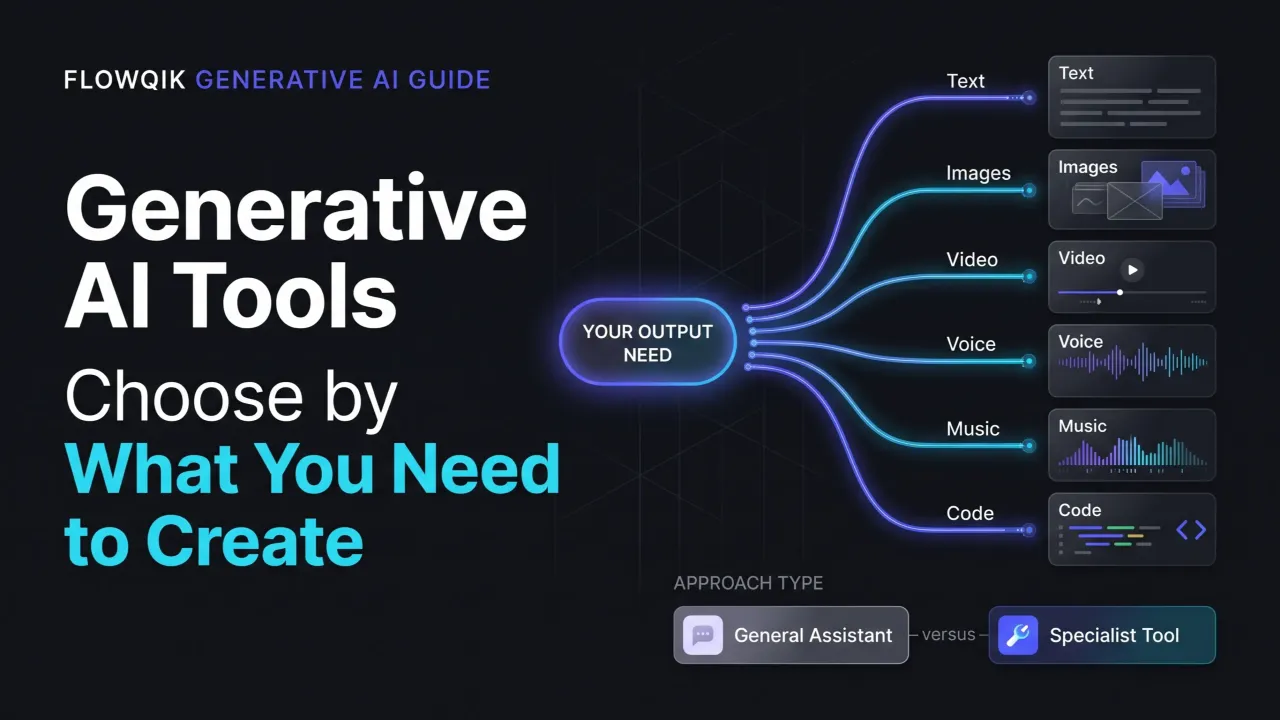
Generative AI tools are software that creates new output from a prompt or a source file: a draft, an image, a video clip, a voiceover, a song, or working code. The market is now large enough that "which one is best?" has no single answer. A tool that produces excellent product photography can be useless for writing a proposal, and the assistant that drafts your strategy memo will not replace a dedicated video studio.
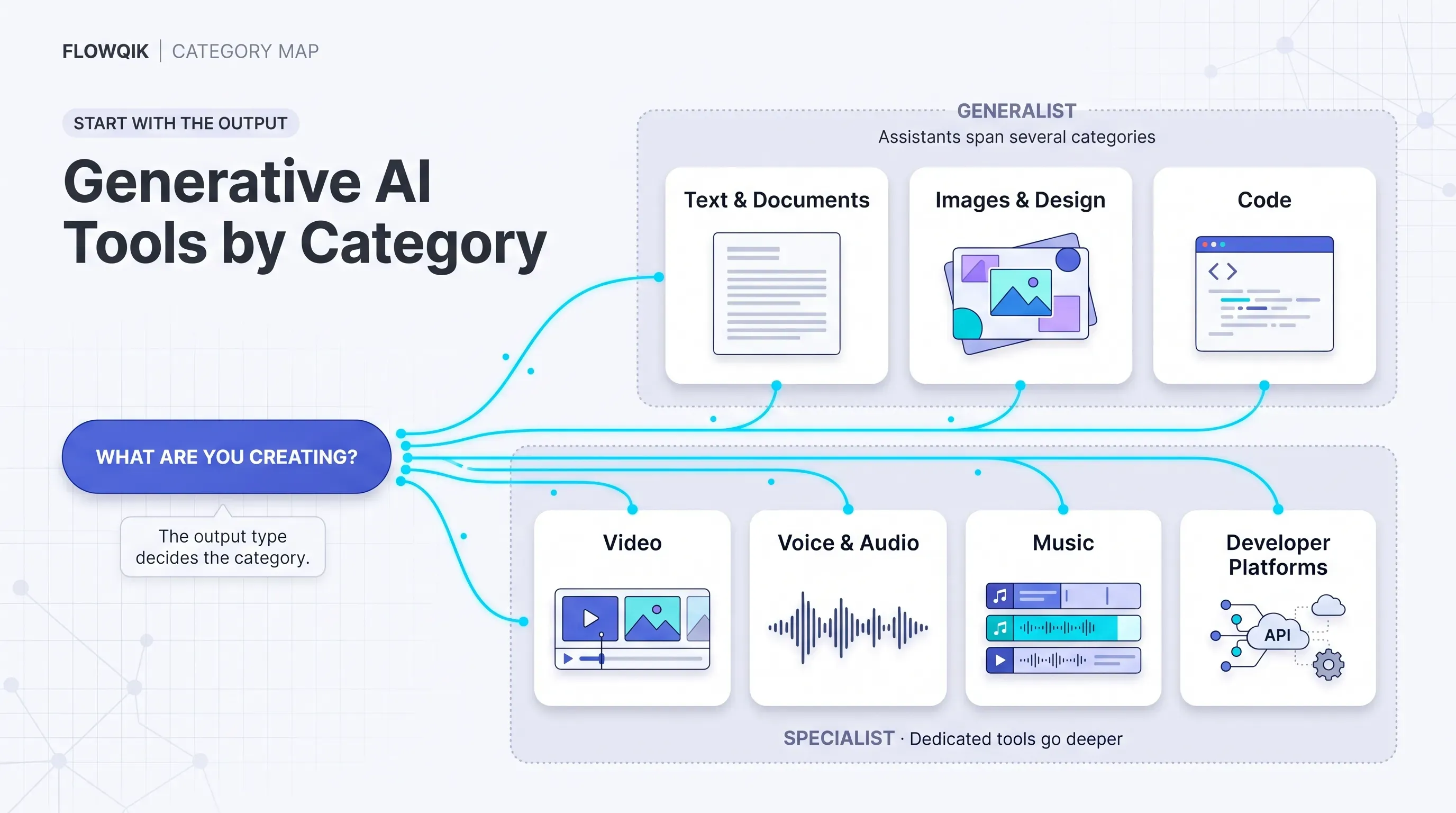
This guide is built to help you get from that crowded market to a realistic shortlist. It sorts the leading generative AI software into categories by what each tool actually generates, explains who each option fits, and flags the tradeoffs that matter before you pay: output control, commercial-use terms, data handling, and credit-based pricing. It is a research-led comparison based on official product documentation, pricing pages, and policy pages checked in October 2026, not hands-on testing, so the recommendations are editorial judgments about fit rather than benchmark results.
If you want the widest view of AI software, including tools that are not primarily generative, start with FlowQik's Best AI Tools guide. This page stays focused on tools whose main job is generation.
What Counts As A Generative AI Tool
A generative AI tool uses a generative model to produce new content rather than classify, predict, or move existing data. In practice that means one or more of these outputs: text, images, video, speech and voice, music, code, slides and designs, or a combination of them.
To keep this comparison useful, a product needed to pass three tests to be included:
- Generation is the core job. The product exists to create or transform content. A spreadsheet app with one AI button does not qualify.
- It is current and broadly available. The product is live and purchasable today, not a research demo or a discontinued service.
- It represents a meaningful choice. It either leads its category or offers a distinct approach (for example, licensed training data, an avatar-based workflow, or a codebase-aware agent).
That standard also excludes several adjacent categories. Automation platforms that call a language model as one step in a workflow are automation tools first; FlowQik compares them separately in Best AI Automation Tools. Agent-building platforms appear here only where they are also the main route to generative models for developers. Predictive analytics software, AI detectors, and grammar checkers are not generative tools in this sense, even when they use similar technology.
How Generative AI Software Is Organized
The most useful way to read this market is in layers rather than one ranked list.
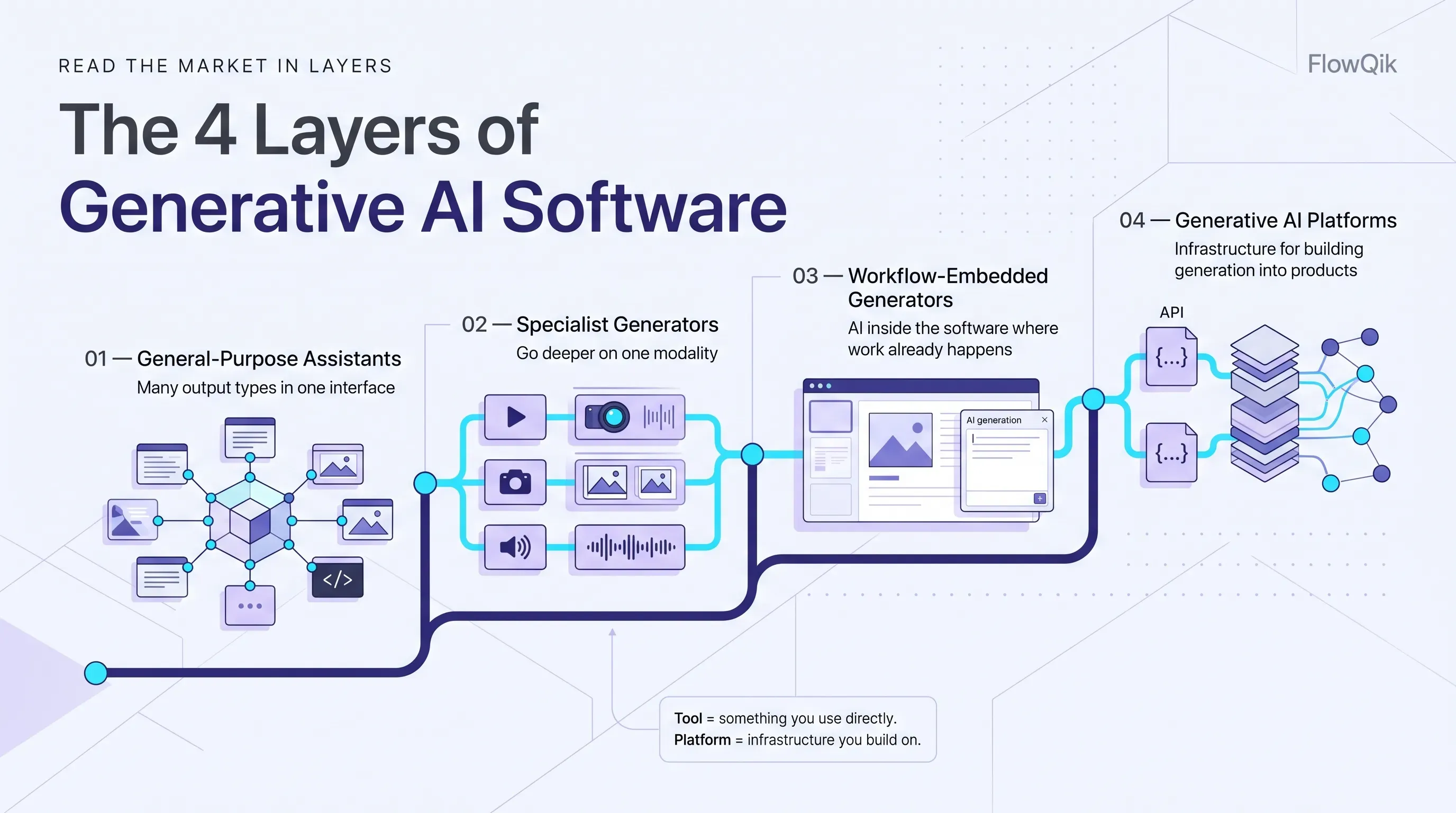
General-purpose assistants such as ChatGPT, Claude, and Gemini handle many output types inside one chat interface. They are the default starting point for most people because they cover writing, analysis, and increasingly images and code.
Specialist generators focus on one modality and go deeper on it. Midjourney and Firefly for images, Runway and Synthesia for video, ElevenLabs for voice, and Suno for music offer controls, formats, and production features a general assistant does not.
Workflow-embedded generators put generation inside software you already use for a job: Microsoft 365 Copilot in Office apps, Canva in a design editor, Gamma in a presentation builder, GitHub Copilot in a code editor. Their value comes from context and placement as much as raw model quality.
Generative AI platforms such as Amazon Bedrock, Google's Gemini Enterprise Agent Platform, and Microsoft Foundry give developers access to many models through APIs so they can build generation into their own products.
This layering also answers a common question: what is the difference between a generative AI tool and a generative AI platform? A tool is an application you use directly to create something. A platform is infrastructure for building or running generation at scale, usually with model choice, security controls, and usage-based billing. Most business users need tools; most product teams eventually need a platform.
General-Purpose Generative AI Assistants
These products compete on breadth. All of them write, summarize, analyze uploaded files, and help with code. The meaningful differences are in which extra modalities they offer, where they integrate, and how they handle business data.
ChatGPT
Best for: people and teams who want the broadest set of generation features in one app.
ChatGPT combines text generation, file analysis, web search, and image generation with an editor that lets you select part of an image and describe a change. OpenAI's help center states that image generation is available on all ChatGPT tiers, including free, on web and mobile. Coding is handled through Codex, which is included in ChatGPT plans (covered in the coding section).
For business buyers, OpenAI states that ChatGPT Business, Enterprise, and Edu do not use workspace data to train models by default, that customers own their inputs and outputs, and that these plans have completed SOC 2 Type 2 audits. Admins on Business and Enterprise can control retention. Plans run from Free through Go, Plus, and Pro for individuals, then Business and Enterprise for organizations; OpenAI notes that the Go tier may include ads.
Keep in mind: video is no longer part of OpenAI's consumer offering in the way it was in 2025. OpenAI announced in March 2026 that it was discontinuing Sora; the Sora app shut down in April 2026, with the API scheduled to follow. If video matters to you, plan on a dedicated video tool. Model names and plan allowances also change frequently, so check the current pricing page rather than relying on older reviews.
Claude
Best for: long-form writing, research, analysis of large documents, and teams that want strong coding support from the same subscription.
Claude, from Anthropic, focuses on text, reasoning, and code rather than media generation. Every plan, including Free, can create and edit files using code execution, connect to other apps through connectors, and search the web. Paid plans add Research, Projects, and Claude Code, Anthropic's agentic coding tool. Claude's pricing page does not list native image or video generation, which is the clearest dividing line against ChatGPT and Gemini.
On data handling, Anthropic's pricing page lists no model training on content by default for Team and Enterprise. Consumer plans (Free, Pro, Max) let each user decide whether their chats can be used to improve the models, and incognito chats are excluded. Enterprise adds SCIM, audit logs, custom data retention, and role-based access.
Consider it if: your main generative output is writing, structured documents, or code, and you would rather pair a strong text assistant with a specialist image or video tool than rely on one app for everything.
Gemini
Best for: users and organizations that already live in Google's ecosystem, and creators who want text, image, video, and music generation under one subscription.
The Gemini app covers text, research, and image generation (using Google's Nano Banana image models) on the free tier. Paid Google AI plans (Plus, Pro, and Ultra tiers) raise usage limits and add video generation, monthly credits for Google Flow, Google's AI filmmaking studio, and credits for music generation. Google AI Pro also brings Gemini into Gmail, Docs, Sheets, Slides, Drive, and Meet for personal accounts.
For organizations, Gemini is included in most Google Workspace business editions as a core service, and Google states that Workspace does not use customer data to train models without the customer's permission or instruction. That makes Gemini the low-friction choice for a company already paying for Workspace.
Keep in mind: Google's consumer AI plans are compute-based, with premium models and media generation consuming allowance faster. The features available can differ by plan, country, and account type, so confirm what a specific plan includes in your region.
Microsoft 365 Copilot
Best for: organizations standardized on Microsoft 365 that want generation grounded in their own email, files, meetings, and chats.
Microsoft 365 Copilot is less a standalone generator and more generation embedded in Word, Excel, PowerPoint, Outlook, and Teams. Its advantage is context: it drafts using the documents and conversations a user already has access to. Microsoft states that Copilot inherits existing Microsoft 365 permissions, sensitivity labels, and retention policies, and that prompts and responses are not used to train the underlying models. Copilot Chat is available on its own, with the full Microsoft 365 Copilot sold as an add-on to a Microsoft 365 plan.
Keep in mind: the quality of Copilot's output depends heavily on the state of your tenant. Overshared files and messy permissions become visible quickly once an assistant can search everything a user can see, so permission cleanup is usually part of the rollout. It is also not the right tool for creative image or video production.
Image Generation And Design Tools
Most general assistants can now produce a good image, so specialist image tools have to justify themselves through quality, control, and licensing. This category is where those differences show most clearly.
Midjourney
Best for: concept art, mood boards, editorial illustration, and any work where aesthetic quality matters more than literal accuracy.
Midjourney is a subscription image generator known for a strong, recognizable visual style. Its V8.2 model became the default in July 2026, with a focus on image quality and personalization, and it includes an editing model. Paid plans also include short video generation, with HD video on Standard and above.
Keep in mind: licensing and privacy details are plan-dependent. Midjourney's plan comparison states that all plans include its general commercial terms, but companies with more than $1 million in annual gross revenue must use the Pro or Mega plan. Stealth mode, which keeps images out of the public gallery, is available only on Pro and Mega. For client or unreleased brand work, those two points often decide the plan.
Adobe Firefly
Best for: brand, marketing, and agency teams that need output they can defend commercially, especially if they already use Photoshop, Illustrator, or Premiere.
Firefly generates and edits images, video, audio, and vector graphics. Adobe states that its own Firefly models are trained on Adobe Stock content it has licensed and on public domain content, positions those models as commercially safe, and says it does not train on customers' personal or generated content. Firefly outputs carry Content Credentials, which label that AI was used.
Firefly now also offers partner models inside the same app, including Google's Gemini image models, OpenAI's GPT Image, FLUX, Runway, Kling, Luma, and ElevenLabs. That gives one interface access to many generators, but Adobe's commercial-safety positioning applies to Adobe's own models. Its model picker lists commercially safe models separately from partner models.
Consider it if: brand risk and content provenance matter more than having the most stylized output. Paid plans use generative credits, and premium features such as video and partner models consume credits faster.
Canva
Best for: marketers, small businesses, and non-designers who need finished, on-brand assets rather than raw generated images.
Canva's AI features sit inside its design editor, which is the point. Users can generate images, video, music, and voiceover, use Canva AI as a design assistant, separate a flat image into editable layers with Magic Layers, and build interactive pieces with Canva Code. Because the output lands in an editable design with templates and brand kits, there is less work between "generated" and "published."
Keep in mind: Canva meters AI through a shared allowance, and its pricing page states that Standard, Premium, and Ultra AI tools consume that allowance at different rates. Heavy generation users should check the allowance on their plan. Canva is a strong production tool, but it is not where you go for the deepest image-model control.
Gamma
Best for: turning an outline, notes, or an existing document into a first-draft presentation, document, or simple web page.
Gamma generates structured, designed content rather than single assets. It can produce presentations, documents, websites, social posts, and graphics, and it exports to PDF, PowerPoint, PNG, and Google Slides even on the free plan. Paid plans add more slides per prompt, remove Gamma branding, add premium image models, and (on Pro) API access.
Keep in mind: a generated deck is a starting point. The structure and design are usually useful immediately, but the claims, numbers, and story still need a human pass, especially for client-facing material.
Video Generation Tools
Video is the fastest-moving and most expensive category to use. It is also where specialist tools still clearly outperform general assistants, because production needs (shot consistency, camera control, resolution, editing) go well beyond generating a single clip.
One market change matters here. Many comparison articles still recommend OpenAI's Sora, but OpenAI announced in March 2026 that it was discontinuing Sora in both the app and the API. The app closed on April 26, 2026. Any shortlist built from an older article should be rechecked.
Runway
Best for: filmmakers, agencies, and video editors who want a dedicated generative video studio.
Runway is built around video. Its own models include Gen-4.5 for video generation and Aleph for editing existing footage, and the platform now also offers third-party models (including Seedance, Kling, and Google's Nano Banana Pro and Lyria) alongside image, audio, and text-to-speech tools. Higher plans add brand kits, voice clones, 4K upscaling, and professional output formats such as ProRes. A separate developer platform provides API access.
Keep in mind: Runway uses credits, and the cost depends on the model, duration, and resolution. Its pricing page lists Gen-4.5 at 12 credits per second of video, so a few minutes of experimentation can consume a monthly allowance quickly. Budget by expected output seconds, not by number of prompts.
Google Flow And Veo
Best for: creators and marketers who already pay for a Google AI plan and want cinematic clips without another subscription.
Flow is Google's AI creative studio for video and images, powered by Google's generative models, including the Veo video models. Veo 3.1 is the current Veo generation in Google's developer API, where older Veo versions were retired in June 2026. For consumers, Flow access comes through credits bundled with Google AI plans, with higher tiers receiving many more credits. Developers can use Veo through the Gemini API or Google Cloud.
Consider it if: you are already a Google AI subscriber. The bundled credits make Flow an easy first video tool. Teams that need heavier editing and production control may still find a dedicated studio like Runway a better fit.
Synthesia
Best for: training, onboarding, internal communications, and sales enablement videos that need a presenter rather than cinematic footage.
Synthesia generates videos of AI avatars delivering a script, which is a different job from text-to-video models. It supports 140+ languages and voices, offers dubbing, lets paid users create personal avatars, and includes team collaboration, brand kits, and an API. Enterprise adds SAML SSO and SCORM export for learning management systems.
Keep in mind: the free plan adds a Synthesia watermark, and plans are credit-based. Avatar video is efficient for informational content but is not a substitute for creative video production.
Voice, Audio, And Music Generation
Audio tools are often bought last and used constantly once adopted. Voiceovers, dubbing, podcasts, and background music are recurring needs for creators and marketers.
ElevenLabs
Best for: voiceovers, narration, dubbing, voice cloning, and product teams adding speech to applications.
ElevenLabs covers text to speech, speech to text, voice design, sound effects, music, and dubbing, with instant voice cloning from its Starter plan and professional voice cloning from Creator upward. It is also widely used as an API for adding voice to apps and agents.
Keep in mind: ElevenLabs' pricing page lists the commercial license from the Starter plan upward, not on Free. Voice cloning also carries obvious consent obligations; only clone voices you have clear rights to use.
Suno
Best for: creators and marketers who need complete songs, jingles, or background tracks with vocals.
Suno generates full songs, including lyrics and vocals, from a text prompt. In 2026 it launched v6 models developed with Warner Music Group, BMG, and Believe, following Warner's settlement with Suno in late 2025, and added features such as partial song editing. The v6 and v6-wild models are on paid plans; the free plan uses a lighter model.
Keep in mind: commercial-use rights apply to the Pro and Premier plans, not Free, and free-plan songs cannot be downloaded. AI music licensing is still being shaped by settlements and court cases, so anyone using generated music in paid campaigns or distributed releases should read the current terms carefully.
Code Generation Tools
Coding tools have moved from autocomplete to agents that plan and make multi-file changes. The decision usually comes down to where you work (editor, terminal, or cloud) and how much autonomy you want to give the tool.
GitHub Copilot
Best for: developers and teams who want AI help without changing editors, especially if code already lives on GitHub.
Copilot works across VS Code, Visual Studio, JetBrains IDEs, Xcode, Neovim, Eclipse, Zed, and the command line, plus GitHub.com and mobile. It offers code completion, chat, agent mode, code review, and a cloud agent that can research, plan, and write code. Plans offer a choice of models from Anthropic, OpenAI, Google, xAI, and others, and higher individual tiers can delegate tasks to third-party agents. Enterprise adds codebase indexing and custom models for completion.
Keep in mind: Copilot now meters chat, agent, review, and CLI usage through AI credits, while code completions do not use credits. Heavy agent users should watch consumption, because costlier models use credits faster.
Cursor
Best for: developers willing to adopt an AI-first editor to get deeper agentic workflows.
Cursor is a code editor designed around AI agents. Paid plans add extended agent limits, frontier model access, cloud agents, and support for MCP servers, skills, and hooks. Teams add centralized billing, SSO, shared rules, and team-wide privacy mode; Cursor states that with privacy mode on, code is not used for training by Cursor or its model providers.
Keep in mind: every plan includes a set amount of model usage, after which on-demand usage is billed. Switching editors is also a real cost for teams with established tooling.
Claude Code
Best for: developers who want an agent that works across an entire repository: reading code, editing files, running commands, and creating commits and pull requests.
Claude Code runs in the terminal, in VS Code and JetBrains IDEs, in the Claude desktop app, and on the web. It reads project instructions from a CLAUDE.md file, connects to tools through the Model Context Protocol, and can run parallel sub-agents. It is included in paid Claude plans (Pro and above) and is also available through Anthropic Console accounts, with the CLI and IDE extensions supporting some third-party cloud providers.
Consider it if: your bottleneck is larger tasks such as refactors, test coverage, or bug investigations, rather than line-by-line suggestions. Agentic tools still need code review, sensible permissions, and tests to catch mistakes.
OpenAI Codex
Best for: developers who already pay for ChatGPT and want to delegate coding tasks, including long-running ones in the cloud.
Codex runs inside ChatGPT, in the cloud on the web, as an IDE extension, as a CLI, and in a desktop app. It can run multiple agents in parallel, keep working on cloud tasks when your laptop is closed, review pull requests automatically, and connect to tools such as GitHub and Slack. Usage is included in ChatGPT plans, with higher plans getting higher limits.
Keep in mind: Codex and Claude Code now overlap heavily. For many developers, the deciding factor is which assistant subscription they already pay for and which one's output they trust more on their own codebase. Running both on a sample of real tasks before committing is a reasonable approach.
Generative AI Platforms For Building Your Own Applications
If you want to add generation to your own product or internal systems, you need model access through APIs rather than an end-user app. The three major cloud platforms are the most common route for organizations with security and procurement requirements. Direct APIs from OpenAI, Anthropic, and Google are the simpler route for smaller teams.
Amazon Bedrock
Amazon Bedrock provides access to foundation models from many providers through one AWS service, along with tools for evaluation, retrieval (Knowledge Bases), fine-tuning, guardrails, and agent building. AWS states that Bedrock does not store or use customer data to train models. It is the natural fit for teams whose data and applications already run on AWS.
Gemini Enterprise Agent Platform (Formerly Vertex AI)
In April 2026, Google introduced Gemini Enterprise Agent Platform as the evolution of Vertex AI, stating that all Vertex AI services will now be delivered through it. It provides Gemini models, Google media models, and more than 200 models in Model Garden, including third-party models such as Anthropic's Claude. Teams that read older guides recommending "Vertex AI" should look for it under the new name.
Microsoft Foundry
Microsoft Foundry (previously Azure AI Foundry) offers a model catalog of over 10,000 models, including Azure OpenAI models and models from Anthropic, Meta, Mistral, DeepSeek, Cohere, and others. Microsoft distinguishes between models it sells directly under Microsoft terms and partner models under their providers' terms, a difference that matters for support and licensing.
How to choose among them: the deciding factor is rarely the model list, which overlaps heavily. It is where your data, identity management, and cloud spend already sit. These platforms also support agent building, but agent architecture belongs in FlowQik's AI Automation Guide rather than here.
One Platform Or Several Specialist Tools?
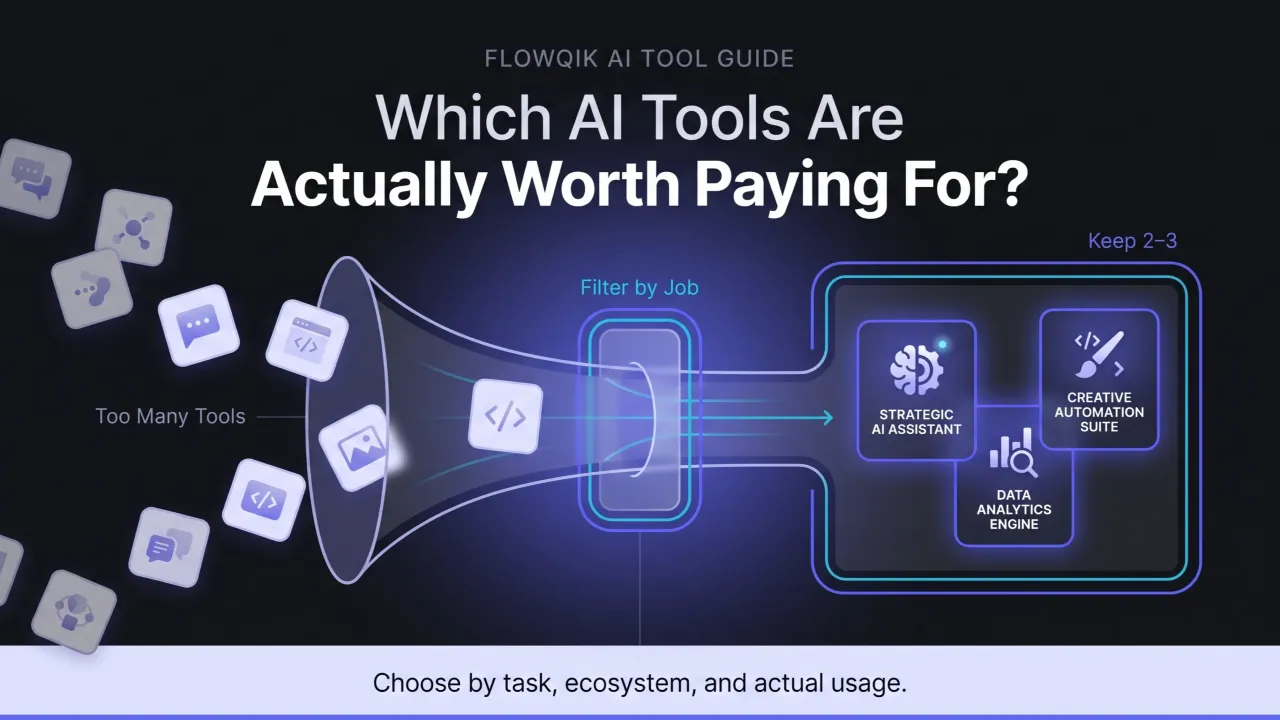
This is the decision most readers actually face, and the honest answer is usually "one general assistant plus one or two specialists."
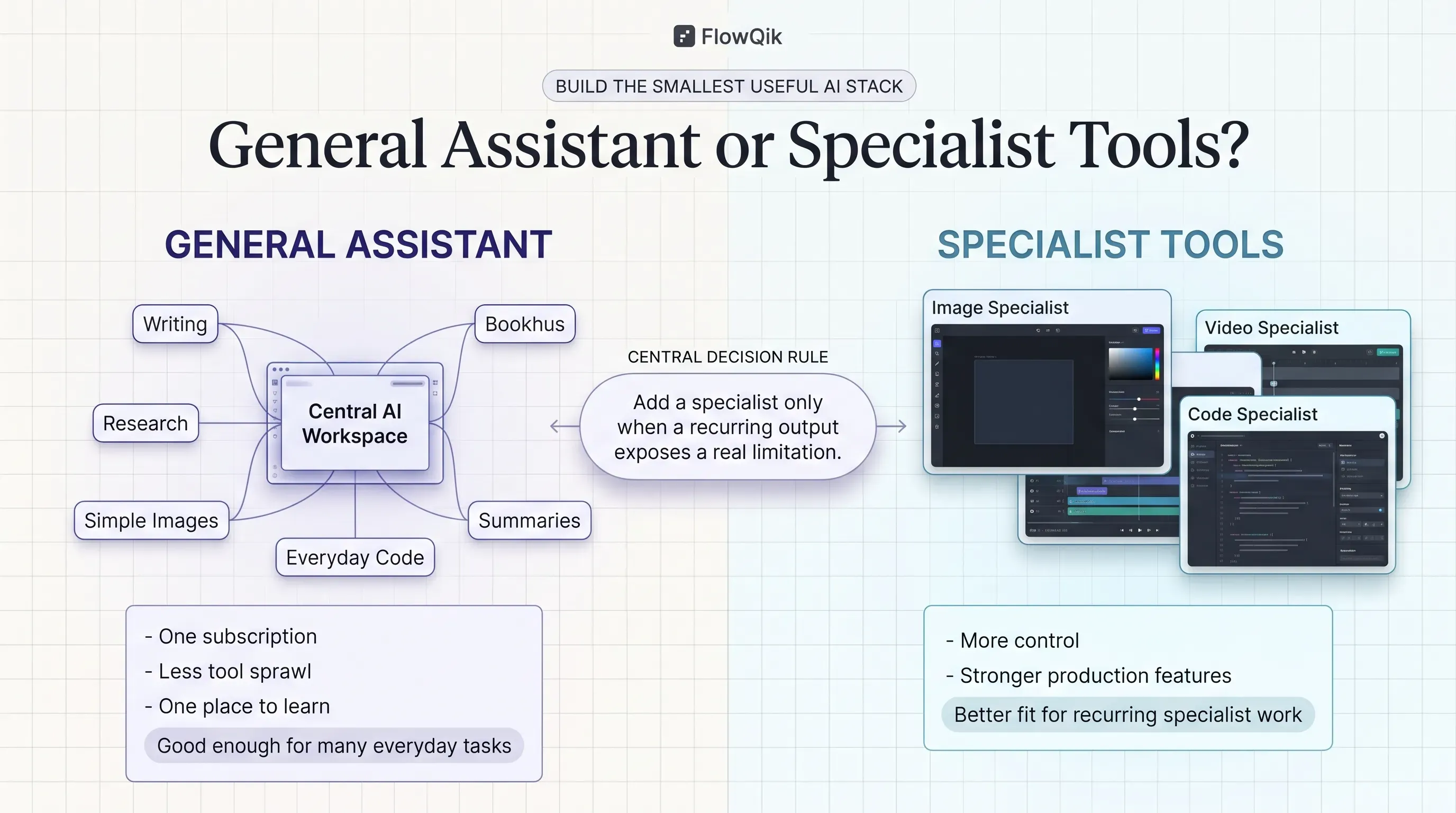
A general-purpose assistant reduces tool sprawl. One subscription, one admin console, one data policy to review, and one place for staff to learn. For drafting, summarizing, brainstorming, simple images, and everyday code help, ChatGPT, Claude, Gemini, or Microsoft 365 Copilot will cover most needs.
Specialist tools earn their place when output quality or production control becomes the bottleneck. A general assistant can produce an image; Firefly adds licensed-training positioning and Creative Cloud integration, and Midjourney adds a distinctive aesthetic. A general assistant can draft a script; Synthesia turns it into a presenter video in dozens of languages. A general assistant can suggest code; Claude Code, Codex, Copilot, and Cursor work inside the repository.
A practical rule: add a specialist tool only when you can name a recurring output that your general assistant handles poorly, and when someone will use the specialist tool often enough to learn it. Otherwise, the extra subscription becomes another credit balance nobody tracks.
Which Tools Fit Which Users
Business users usually get the most from the assistant that matches their existing productivity suite: Microsoft 365 Copilot in a Microsoft organization, Gemini in a Google Workspace organization, or ChatGPT Business or Claude Team where teams want a standalone assistant. Priorities are data controls, admin features, and how well the tool works with company documents.
Creators should pick by modality. Midjourney or Firefly for images, Runway or Flow for video, ElevenLabs for voice, and Suno for music. Commercial-use terms and plan-specific rights matter here more than for any other group.
Marketers typically need speed and brand consistency more than maximum creative control. Canva for finished assets, Gamma for decks, Firefly for brand-safe imagery, and a general assistant for copy cover most campaign work. Readers whose focus is specifically content production can go deeper in FlowQik's guide to AI tools for content creation.
Developers should separate two questions: which coding tool to use daily (Copilot, Cursor, Claude Code, or Codex) and which platform to build on (direct APIs, Bedrock, Gemini Enterprise Agent Platform, or Foundry). The first is a personal workflow choice; the second is an architecture decision tied to existing infrastructure.
Risks And Limits To Check Before You Commit
Generative AI software produces confident output that is sometimes wrong. Text tools can state incorrect facts, image and video tools produce artifacts and inconsistent characters across shots, and coding agents can introduce subtle bugs. Every workflow needs a review step proportional to the stakes.
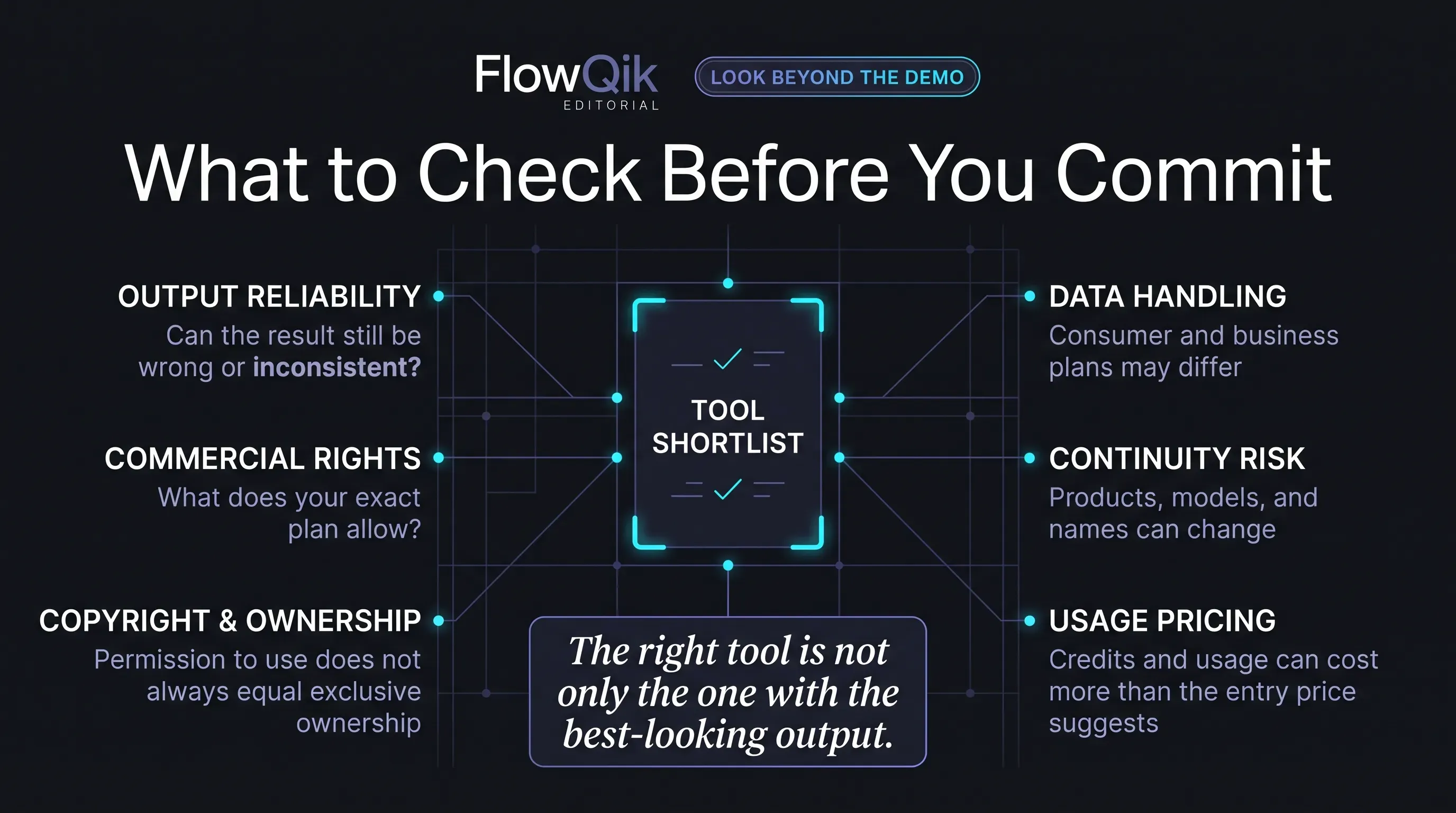
Commercial use is plan-specific. Several tools on this list reserve commercial rights for paid plans (ElevenLabs and Suno), or add conditions based on company size (Midjourney). Read the terms for the exact plan you intend to buy.
Copyright protection is not the same as permission to use. The U.S. Copyright Office's 2025 report on copyrightability concluded that material generated purely by AI, without sufficient human creative control, is not protected by copyright. A tool may permit commercial use of an output that you still cannot register or exclusively own. Human editing and arrangement strengthen your position.
Data handling differs between consumer and business plans. The same product can have different training and retention defaults depending on whether you use a personal or a business account. ChatGPT, Claude, Gemini in Workspace, and Microsoft 365 Copilot all state that business content is not used for training by default, while consumer plans typically give users a choice or an opt-out.
Products change and sometimes disappear. Sora's shutdown, Vertex AI's rebranding, and frequent model retirements in 2026 show how fast this market moves. Avoid building critical workflows around one tool without an exit plan, and keep source files and prompts outside the tool.
Credit-based pricing makes costs hard to predict. Video, music, and premium image models consume credits at very different rates. Estimate usage from a realistic monthly output volume, not from the plan's headline price.
For readers whose main constraint is budget, FlowQik's Free AI Tools guide covers what is realistically available at no cost.
D. How To Choose A Generative AI Tool
Use these questions in order. Each one narrows the field before the next.
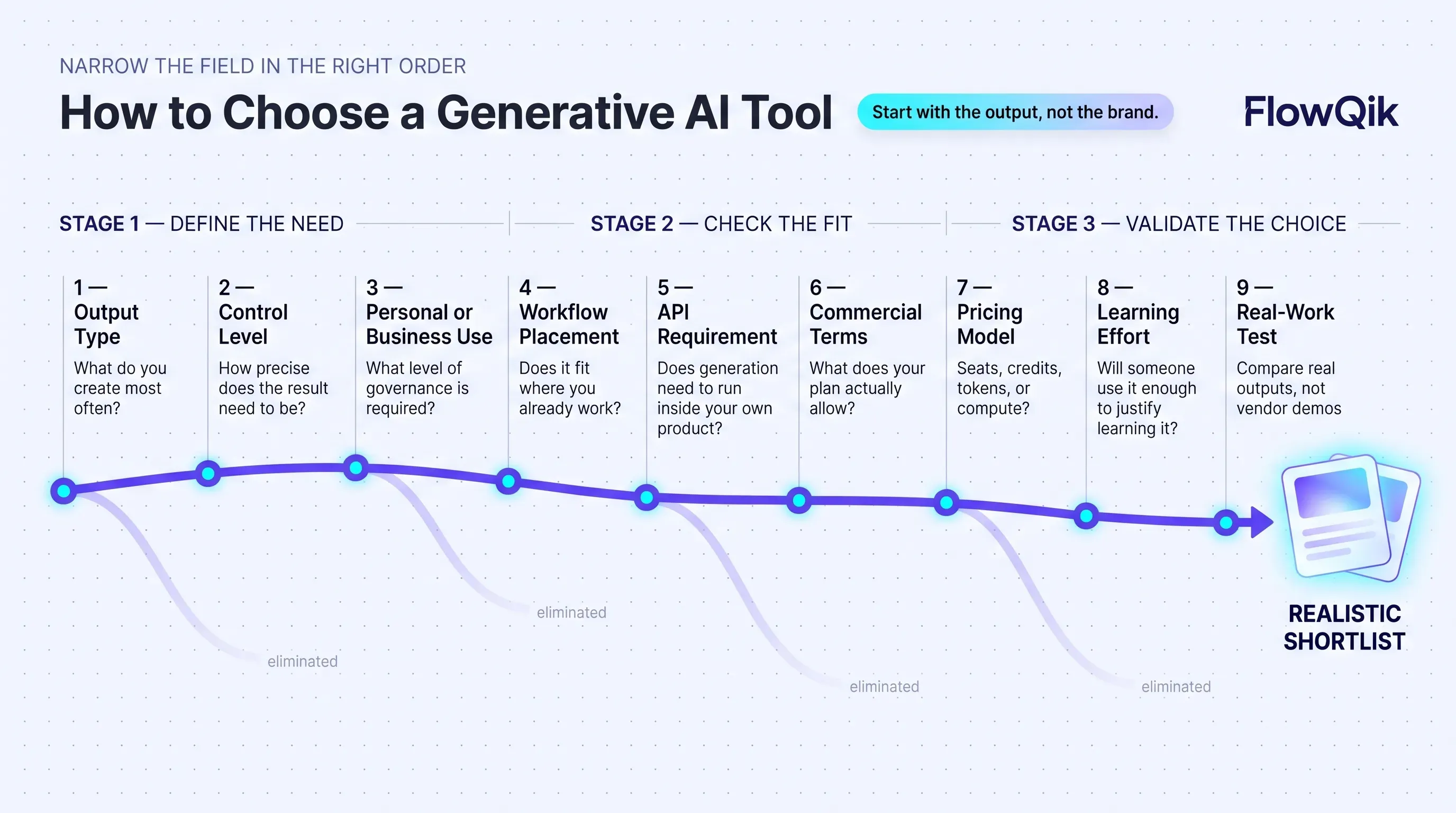
1. What output do you actually need, and how often? List the outputs you produce each month (reports, social images, explainer videos, voiceovers, code changes). The most frequent output decides your first tool; occasional needs can usually be met by a general assistant.
2. How much control does the output need? A quick internal image needs little control. A product video for a paid campaign needs consistent characters, specific framing, and editable results. The more control you need, the stronger the case for a specialist tool.
3. Is this for personal or business use? Business use raises the bar on data training defaults, retention controls, SSO, admin features, and compliance documentation. Check that the business features you need are on the plan you are pricing, not only on Enterprise.
4. Where does the tool need to fit? Generation inside the apps you already use (Microsoft 365, Google Workspace, Adobe, GitHub, your IDE) usually beats a better model in a separate tab, because people actually use it.
5. Do you need an API? If generation must run inside your own product or process, prioritize tools with documented APIs or move to a platform such as Bedrock, Gemini Enterprise Agent Platform, or Foundry.
6. What do the commercial terms say for your plan? Confirm commercial rights, revenue thresholds, attribution or watermark rules, and any indemnity before using outputs in client work or paid media.
7. How is usage priced? Identify whether the tool charges by seat, by credits, by tokens, or by GPU time, and estimate a realistic month of use. Credit-heavy tools (video and music especially) can cost far more than the entry price suggests.
8. Who will learn it? A tool with a steep learning curve pays off only if someone uses it regularly. For occasional needs, accept a general assistant's limits.
9. Can you test it on real work? Most tools on this list have a free tier, trial, or low entry plan. Run the same three or four real tasks through each shortlisted tool and compare the results that matter to you, rather than relying on demos.
Discussion
Comments
No approved comments yet. Be the first to join the discussion.